Restoring a deployment
Return an environment to a deployment it ran before, exactly as it ran, such as when a new version misbehaves. piqueld deploys it again with the same manifest, images and secrets, without building anything. It can also do this on its own when a rollout fails.
Before you start
- The environment has an earlier deployment that succeeded. This page uses
hello, from deploying your first application, once you deployed it again after changing it. - Restoring an environment’s deployment needs
apps:deployon the application, and a preview’spreviews:deploy. Choosing whether an environment rolls back on its own needsapps:write; see permissions. piquelctlis signed in. Run the commands on this page on the host, or on any machine wherepiquelctlis signed in.
Restore a deployment
In the dashboard
-
Open the environment, such as production on
hello’s Environments tab, then its Deployments tab. It lists the environment’s deployments, newest first. -
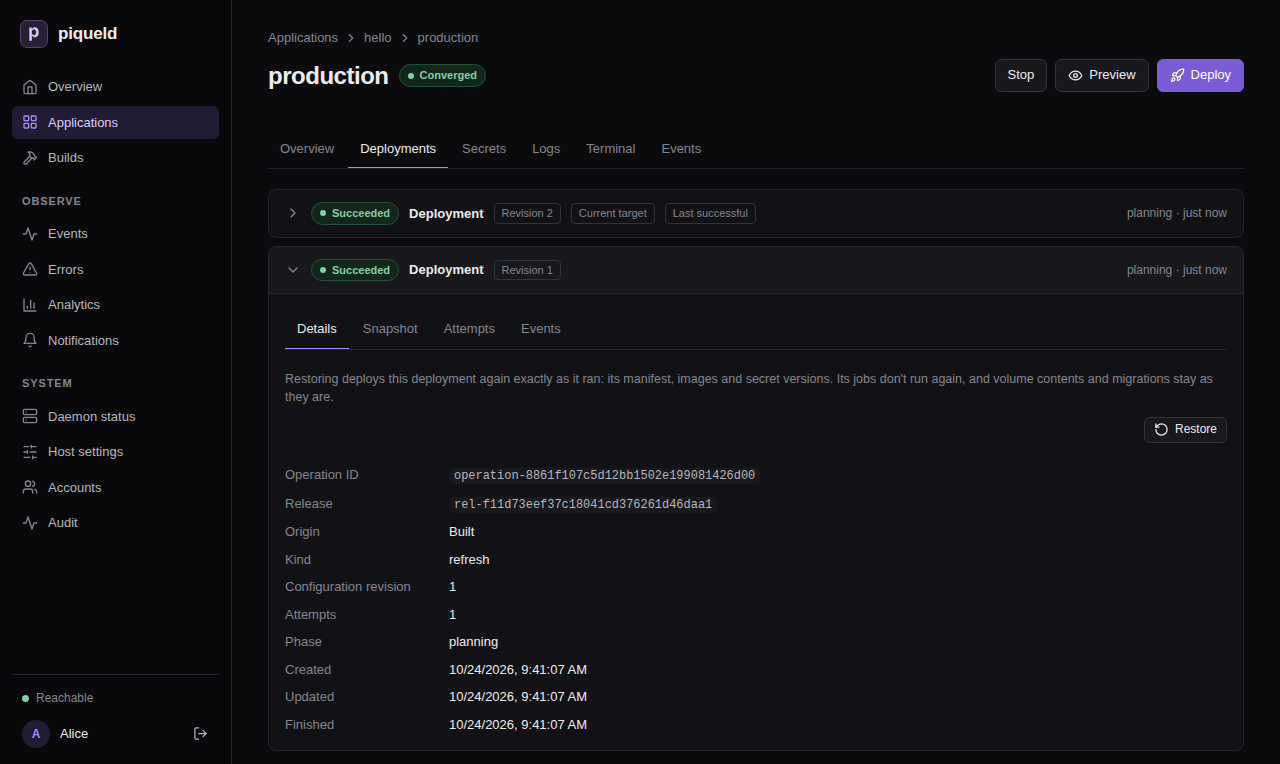
Select the deployment to return to, to expand it. Each deployment that succeeded offers Restore, except the newest one when the environment runs it. So after a deployment failed, you can restore the one before it.
-
Select Restore, and confirm.
The restore is a new deployment, at the top of the list. Its Origin reads “Restored from deployment” and the ID of the one it restored.
With piquelctl
-
List the environment’s deployments, newest first:
$ piquelctl env history hello production
operation-01a16da0f1c87a5e9b9d2b53a4f35b11  succeeded  created 1792841305114  (current, last successful)
  Origin: built from its source
  Release: rel-01a16da0f4e17c2c84b4b8b6c1a5b8d2
operation-01a16d9f8e3b7e6aa1f27c46d0b9a3c4  succeeded  created 1792841213922
  Origin: built from its source
  Release: rel-01a16d9f90cf73f1b2a1e5d43e2c7f19
Each line has the deployment’s ID, its outcome, and when it was created, in Unix milliseconds.
currentmarks the one the environment runs. The command lists three deployments at a time, up to 100 with--limit, and prints a cursor to pass with--cursorfor older ones. -
Restore the earlier one:
piquelctl env restore hello production operation-01a16d9f8e3b7e6aa1f27c46d0b9a3c4After you confirm, the command waits until the deployment finishes. Add
--no-waitto return once piqueld accepts it.
For a preview, use its Deployments tab in the dashboard,
or piquelctl preview history and piquelctl preview restore, which name the
preview as other preview commands do:
piquelctl preview history blog feat/login
piquelctl preview restore blog feat/login <deployment-id>
There is no restore in the manifest: it describes what to deploy, not which deployment to return to.
What a restore deploys
A restore deploys what the earlier deployment ran: its manifest with the values its variables had, its images, and the versions of its secrets. piqueld fetches and builds nothing, and never uses a newer secret version. It works for any environment, including promoted ones, and starts a stopped environment again.
The restored deployment becomes the one piqueld keeps running. The saved configuration doesn’t change, though: the environment’s next deployment deploys its source again, as does the next push to its branch when it deploys on push. piqueld also deploys a push it hasn’t processed yet, such as one it missed while it was stopped. Fix the cause, or revert it in the repository, before you deploy again.
Warning: a restore never runs jobs, and doesn’t revert data. Volumes keep their contents, and the migrations that ran since stay applied: running the earlier deployment’s migrations against newer data is what a restore avoids. So the restored version must work with the data as it is. Write migrations in steps that the previous version still runs against, such as adding a column before the code that needs it.
A promoted environment can also deploy an earlier release, rendered with its current variables and secrets instead.
Roll back failed rollouts automatically
A rollout fails when Docker pauses it because a new container exited, or failed its health check, soon after it started. Each environment chooses what happens then:
- Automatic restores the environment’s last successful deployment at once, as a restore by hand would.
- Manual leaves the environment on the failed deployment until you deploy it again or restore a deployment.
Promoted environments roll back
automatically unless you choose otherwise. The others don’t, and previews are
never rolled back. To have production roll back on its own:
-
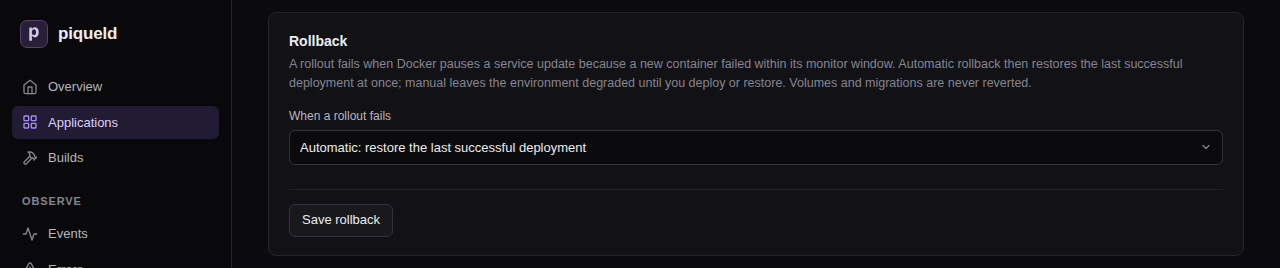
In the dashboard, open the environment’s Overview. In its Rollback card, set When a rollout fails to Automatic: restore the last successful deployment, then select Save rollback. Default removes the setting.
-
With
piquelctl, useenv rollback, withautomatic,manual, ordefaultto remove the setting:piquelctl env rollback hello production automatic -
In the manifest:
[spec.environments.production]
rollback = "automatic"
The dashboard and piquelctl save the setting in the application’s manifest.
piqueld reads it from the manifest the environment deploys, though, so when a
change applies depends on where the environment gets its manifest:
- In an application without a manifest repository, an environment that isn’t promoted uses it at once.
- In an application that reads its manifest from a repository, an environment that follows the repository’s branch uses it from its next deployment. A push that changes the manifest file replaces the setting, so set it in the file too.
- An environment that follows another branch reads the manifest file on that
branch. Set
rollbackthere, then deploy the environment. - A promoted environment reads the release it receives. A change applies once its source deploys a release with it, and you promote that release.
A rollback is a restore: a new deployment that runs no jobs and doesn’t revert data, as the warning above describes. Its Origin reads “Rolled back from deployment” with the failed deployment’s ID, then the ID of the one it restored. The failed deployment keeps its own outcome, so its history still shows what went wrong.
piqueld rolls back each failed deployment once at most. It doesn’t roll back:
- a rollback whose own rollout fails: the environment stays on it;
- a deployment that succeeded before, then fails when piqueld rolls it out again, such as to repair a service someone changed by hand;
- a deployment whose job fails: the job stops it before its services roll out, so they keep running the previous version.
Docker only notices a container that exits or fails its health check.
Without a health check, in the manifest or in its image, a container that
runs but doesn’t serve requests looks healthy, so its rollout doesn’t fail.
When an environment rolls back automatically, its plans warn about each
service that routes send traffic to but whose manifest declares no health
check. Declare one, unless the service’s image
already defines one. The dashboard shows the warning in Preview, and, for
a promoted environment, in the plan that its Promote from button opens.
piquelctl app plan and piquelctl env promote --plan print it as
rollback_without_health_check.
Check that it works
The restore appears at the top of the environment’s Deployments tab, and
of piquelctl env history:
operation-01a16da2c7d05b1e2f8a9c3d4e5f6a7b  succeeded  created 1792841427035  (current, last successful)
  Origin: restored from deployment operation-01a16d9f8e3b7e6aa1f27c46d0b9a3c4
  Release: rel-01a16d9f90cf73f1b2a1e5d43e2c7f19
It runs the release of the deployment it restored.
Troubleshooting
- Restoring fails with
deployment_not_restorable. That deployment never succeeded. Restore one that did. - Restoring fails with
image_unavailable. piqueld removed one of the deployment’s images, and can’t pull it again from a registry. The error names the service and image. piqueld keeps the images of each environment’s last three successful deployments, and of a preview’s current one:images.keep_deployments, in the daemon’s configuration, changes that number. An image piqueld built is never built again for a restore. - Restoring fails with
restore_secrets_unavailable. A secret version the deployment used was deleted since, or discarded by key recovery. The error lists the secrets. Deploy the environment instead. - Restoring fails with
secret_access_denied. The deployment mounts a stored secret that the environment may no longer mount. Allow it again, or deploy instead. - A failed rollout wasn’t rolled back. Previews and manual environments
aren’t rolled back. The Rollback card shows the saved setting, but an
environment of an application that reads its manifest from a repository,
or a promoted one, uses the setting of the manifest it last deployed, as
rolling back automatically
describes. When piqueld can’t roll back,
because no earlier deployment succeeded or its images or secret versions
are gone, the failed deployment records a
rollback_unavailableevent saying why. To see it, expand the deployment on the Deployments tab and select Events. Fix the cause, then deploy again. - There is no Restore button. The deployment didn’t succeed, or it is
the newest one and the environment runs it. Without
apps:deploy, orpreviews:deployfor a preview, the dashboard doesn’t offer it either.
piquelctl env restore
lists the command’s options, and the
API reference describes how a
restore works.