Configuring services
A service is one container image that piqueld runs as one or more replicas.
This page sets up the services of a small application, notes: a PostgreSQL
database, and an nginx web server that starts once the database is ready.
Before you start
- You’ve deployed your first application, so you know how to create an application and add services to it.
- Run the commands on this page on the host, or on any machine where
piquelctlis signed in. - Creating
notesneeds theapps:createpermission. Editing it needsapps:writeon it, and deploying itapps:deploy.
Set it up
notes has two services:
dbruns PostgreSQL. Its password is a secret piqueld generates; see secrets and variables.webruns two replicas of nginx, and starts oncedbis healthy.
Each has a health check, which tells piqueld when it is ready.
Warning: here,
dbkeeps its data in its container. A deployment that changesdbreplaces its container, and the data with it. Before you store anything, give it a volume, as volumes and files shows.
In the dashboard or with piquelctl
Create notes and add db and web to it, as in
deploying your first application,
with the images postgres:17-alpine and nginx:alpine. Then set each service’s
settings as the sections below describe.
In the dashboard, open the application’s Services tab, then the service. Its page has a tab for each group of settings. Once you change a field, select Save changes below it.
With piquelctl, piquelctl app service has a command for each setting.
To give the database its generated password, declare it and mount it as
generating a secret shows. Then
give db the environment variables that PostgreSQL
reads: POSTGRES_USER and POSTGRES_DB, both notes, and
POSTGRES_PASSWORD_FILE, /run/secrets/db-password.
From a manifest
-
Save this manifest as
notes.toml:api_version = "piqueld.dev/v1alpha1" kind = "Application" [metadata] name = "notes" [[spec.services]] name = "db" [spec.services.source] type = "image" image = "postgres:17-alpine" [spec.services.environment] POSTGRES_USER = "notes" POSTGRES_DB = "notes" POSTGRES_PASSWORD_FILE = "/run/secrets/db-password" [[spec.services.secrets]] name = "db-password" target = "/run/secrets/db-password" [spec.services.healthcheck] type = "command" command = ["pg_isready", "-U", "notes"] interval_seconds = 5 start_period_seconds = 30 [[spec.services]] name = "web" replicas = 2 depends_on = ["db"] [spec.services.source] type = "image" image = "nginx:alpine" [spec.services.healthcheck] type = "http" port = 80 path = "/" [[spec.secrets]] name = "db-password" generate = { type = "random", bytes = 32 } -
Save it and deploy it:
piquelctl --timeout 5m app apply --file notes.toml --deploy
Deploy it
app apply --deploy saves the manifest and deploys it at once. A change you
save in the dashboard, or with piquelctl app service, changes the
application’s configuration, not what’s running. To apply it, select Deploy to production on the application’s page, or run
piquelctl --timeout 5m app deploy notes. An application with several
environments deploys one at a time:
piquelctl --timeout 5m env deploy notes <environment>.
The deployment deploys db first, waits until it passes its health check,
then deploys web.
--timeout 5m lets piquelctl wait for the deployment for up to five
minutes, instead of 30 seconds. When a deployment changes a service, Docker
watches its new replicas for 30 seconds, as rollout order
explains, so redeploying often takes longer than the default. The commands in
these guides that deploy use --timeout 5m too.
If piquelctl stops waiting first, it exits with code 4, but the deployment
carries on. Keep following it on the environment’s Deployments tab, or
with piquelctl --timeout 5m env wait notes.
The services of an application reach each other by name: web reaches the
database at db:5432. Services of other applications can’t, unless you
connect the applications.
Replicas
A service runs one copy, or replica, by default, and up to 100. In the
dashboard, set Replicas on the service’s Source & scaling tab. With
piquelctl:
piquelctl app service replicas notes web 3
In the manifest, it is replicas, in the service’s entry.
Environment variables
Every replica of a service gets its environment variables. In the dashboard,
use the service’s Environment tab. With piquelctl:
piquelctl app service env set notes web GREETING hello
piquelctl app service env remove notes web GREETING
In the manifest:
[spec.services.environment]
POSTGRES_USER = "notes"
Values reach the container as written, once
variables are replaced. Docker’s
own templates, such as {{.Service.Name}}, aren’t expanded.
Don’t put passwords here: mount them as secrets instead.
Command and arguments
The command replaces the image’s entrypoint, and the arguments its default
arguments. Each element is one argument, passed as written, without a shell.
To raise PostgreSQL’s connection limit, for example, give db the arguments
-c and max_connections=200:
-
In the dashboard, use the service’s Command & arguments tab, one element per row.
-
With
piquelctl, give the elements after--, and give none to go back to the image’s own:piquelctl app service arguments notes db -- -c max_connections=200 piquelctl app service arguments notes db --piquelctl app service commandsets the command the same way. -
In the manifest, set
commandandargumentsin the service’s entry:[[spec.services]] name = "db" +arguments = ["-c", "max_connections=200"]
Health checks
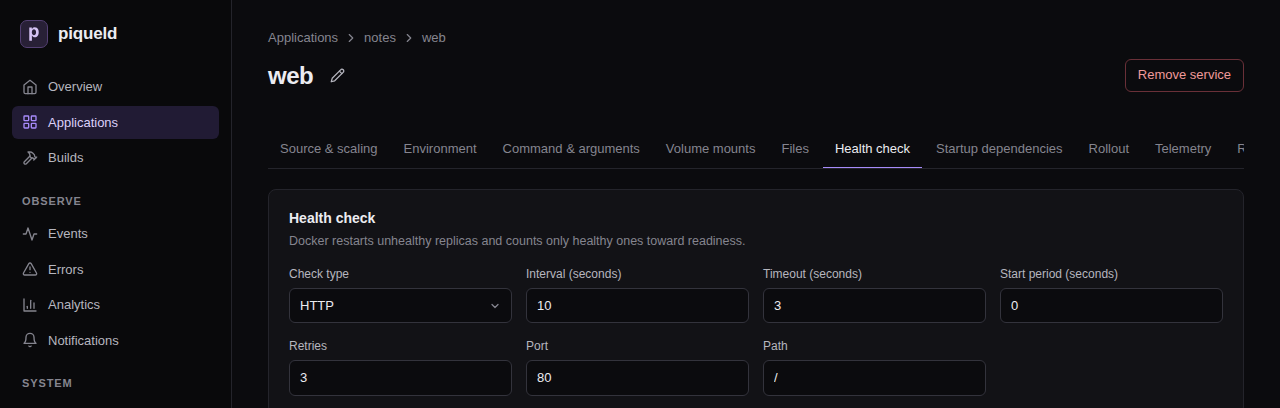
A health check tells piqueld when a replica is ready. Deployments wait for it, and Docker restarts a replica that keeps failing it. A service without a health check counts as ready as soon as it runs.
There are two kinds:
- An HTTP check sends a
GETrequest to a port of the container, which must answer with a 2xx or 3xx status. It needs nothing in the image, not even a shell, so it also works in minimal images. Its path is/healthunless you set one. - A command check runs a program in the container, which must exit with
0. It runs without a shell: to use one, run
sh -c "…".
Both take these settings:
| Setting | Default | Meaning |
|---|---|---|
| Interval | 10 | Seconds between checks. |
| Timeout | 3 | Seconds before a check fails. At most the interval. |
| Retries | 3 | Failed checks in a row before the replica is unhealthy. |
| Start period | 0 | Seconds after the replica starts during which failed checks don’t count. |
Give slow starters, such as databases, a start period.
In the dashboard
Use the service’s Health check tab. Choose the Check type, then fill in its fields. None removes the check.
With piquelctl
health http and health command replace the check. They take the settings
above as --interval, --check-timeout, --retries and --start-period:
piquelctl app service health http notes web 80 --path /
piquelctl app service health command notes db --interval 5 --start-period 30 -- pg_isready -U notes
Other commands change one setting, or remove the check:
piquelctl app service health start-period notes db 60
piquelctl app service health clear notes web
In the manifest
[spec.services.healthcheck]
type = "http"
port = 80
path = "/"
[spec.services.healthcheck]
type = "command"
command = ["pg_isready", "-U", "notes"]
interval_seconds = 5
start_period_seconds = 30
The settings above are interval_seconds, timeout_seconds, retries and
start_period_seconds.
Startup dependencies
A service can depend on other services of the same application, which must
be ready before it is deployed. In the dashboard, check them on the service’s
Startup dependencies tab. With piquelctl:
piquelctl app service depends-on notes web -- db
In the manifest, it is depends_on:
[[spec.services]]
name = "web"
depends_on = ["db"]
A deployment waits until every replica of db passes its health check before
it deploys web. A dependency without a health check counts as ready once its
replicas run. If db fails, web keeps running its previous version.
Dependencies only order deployments: once deployed, web keeps running even if
db stops.
Rollout order
When a deployment changes a service, Docker replaces its replicas one at a time, in one of two orders:
start-firststarts the new replica, then stops the old one. There is no downtime, but both run for a moment.stop-firststops the old replica, then starts the new one. They never overlap, but the service is briefly unavailable.
By default, a service that mounts a volume it can write to stops first, so that two copies of a database never write the same files. Others start first.
Docker also watches each new replica, for 30 seconds by default. If one fails within that time, Docker pauses the rollout: the replicas it hasn’t replaced yet keep running the previous version, and the deployment fails.
To choose the order and how long Docker watches, use the service’s
Rollout tab in the dashboard. With piquelctl, run the command below;
without flags, it restores the defaults:
piquelctl app service rollout notes web --order stop-first --monitor-seconds 30
In the manifest:
[spec.services.rollout]
order = "stop-first"
monitor_seconds = 30
piquelctl app plan --file notes.toml lists each service’s order:
Rollout:
  db: start-first (derived) · monitor 30s
  web: start-first (derived) · monitor 30s
Once db mounts a volume, as in volumes and files,
its order becomes stop-first.
Resource limits
Limit how much CPU and memory each replica may use. Without limits, a replica may use all of the host’s, except in previews, which get the daemon’s defaults. CPU is in thousandths of a core, and memory in bytes.
In the dashboard, use the service’s Resource limits tab, and leave a
field empty for no limit. With piquelctl:
piquelctl app service cpu notes web 500
piquelctl app service memory notes web 268435456
piquelctl app service cpu notes web --clear
In the manifest:
[spec.services.resources]
cpu_millis = 500          # half a CPU core
memory_bytes = 268435456  # 256 MiB
Rename a service
In the dashboard, select the pencil beside the service’s name, on its page.
Fill in Service name and select Save. Save or discard your other edits
to the service first. With piquelctl:
piquelctl app service rename notes web frontend
Its routes, jobs and exports, and the services that depend on it, follow the
new name. In the manifest, change its name, and every place that names it.
Applications that import it must import the new name. The next
deployment replaces the running service with one of the new name.
Check that it works
In the dashboard, open the environment: Observed services lists each
service with its healthy replicas. With piquelctl:
$ piquelctl env show notes
production of notes (env-01a16d95420677219cf7b65149b4f7e8)

Intent: ready
Runtime: ready (observed 6 s ago)
...
Runtime: ready means every service runs all its replicas, and each passes its
health check.
Troubleshooting
- The deployment fails with
service_update_failed. A new replica failed its health check, or exited, and Docker paused the rollout. Read the service’s logs withpiquelctl app logs notes --service web, fix the cause, and deploy again. - A service never becomes healthy. Check that the health check’s port and
path match what the container serves. An HTTP check connects to
127.0.0.1inside the container, so the service must listen there too, such as on0.0.0.0. It doesn’t follow redirects. - The deployment fails with
convergence_timeout. A service didn’t become ready in time. A deployment gives up when no service has become ready for 120 seconds, start periods included, and piqueld then retries on its own. Give a slow service a longerstart_period_secondsso it isn’t restarted while it starts, and raisereconciliation.convergence_timeout_seconds, in the daemon’s configuration, if it needs more than that. - Validation fails with
service_dependency_cycle. Two services depend on each other, directly or through others. Remove one of the dependencies.
Manifest settings lists
every setting of a service, and
piquelctl app service
every command that changes one.