Connecting applications
Let the services of one application reach a service of another application over a private network, without a public route. Both applications have to agree: one exports the service, the other imports it.
Before you start
- You have an application whose services need to reach another one’s, such
as
notes, from Configuring services. This page createsauth, whose serviceapithe services ofnotesreach. Here,apirunstraefik/whoami, a small web server that replies with a description of each request it receives. - Run the commands on this page on the host, or on any machine where
piquelctlis signed in. - Creating
authneeds theapps:createpermission. Editing each side needsapps:writeon its application, and deploying itapps:deploy. Importing needs no permission on the exporting application: its export is its consent. Creating the previews ofnotes, as in Previews, needspreviews:deployon it, and checking the connection fromnotes, as in Check that it works,apps:exec.
Set it up
auth exports api to notes, then notes imports it, and you deploy each
application. You can deploy the two sides in either order: the link connects
once both have deployed it.
In the dashboard
-
Create
auth, with a serviceapithat runstraefik/whoamiand has an HTTP health check on port 80 and path/health, as in deploying your first application. -
On the Links tab of
auth, under Exports, select Add export, pick the Service, and enter the Applications, separated by commas. Select Add export in the dialog, then Deploy to production.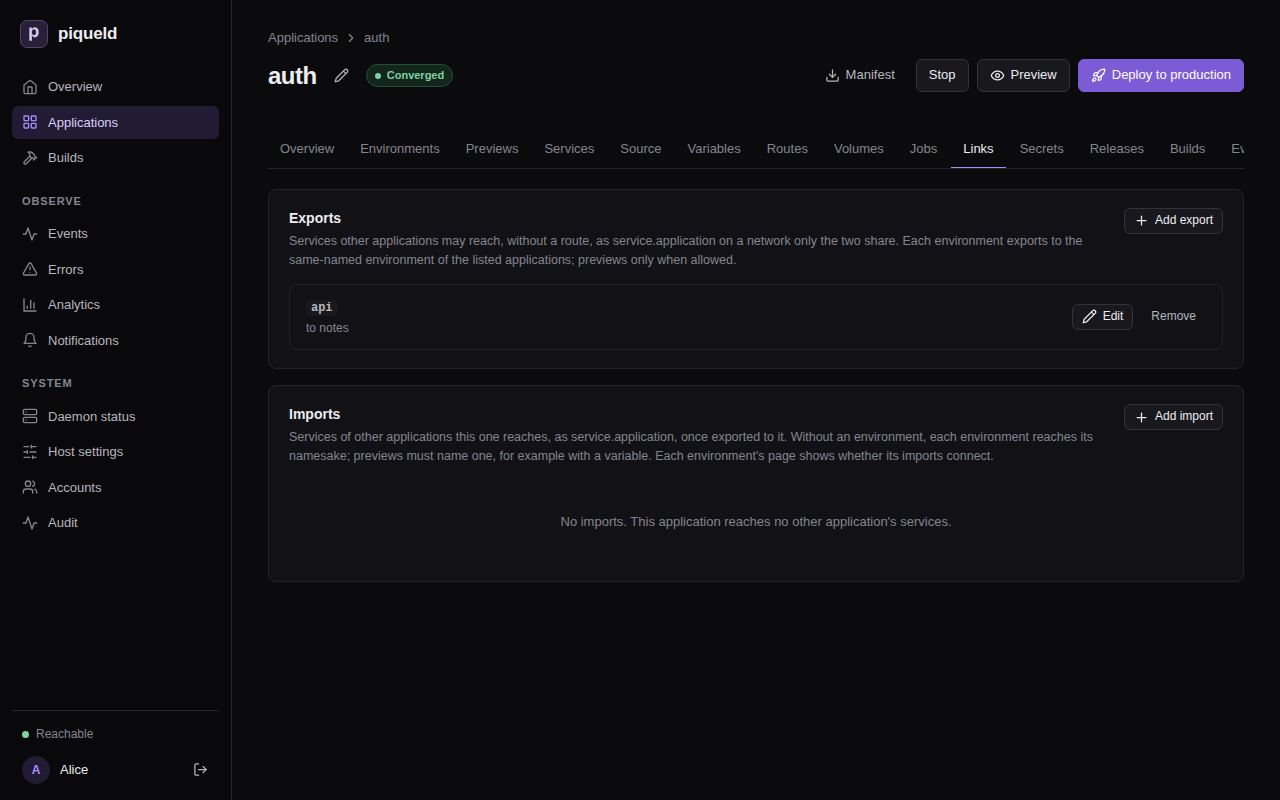
-
On the Links tab of
notes, under Imports, select Add import, and enter the Application and the Service. Leave Environment empty. Select Add import in the dialog, then Deploy to production.
With piquelctl
Create auth with its api service, as in
deploying your first application.
Then export and import the service, and deploy each application:
piquelctl app export set auth api --applications notes
piquelctl app import add notes auth api
piquelctl --timeout 5m app deploy auth
piquelctl --timeout 5m app deploy notes
--applications takes a comma-separated list.
In the manifest
-
In
auth, exportapitonotes. Save this manifest asauth.toml:api_version = "piqueld.dev/v1alpha1" kind = "Application" [metadata] name = "auth" [[spec.services]] name = "api" [spec.services.source] type = "image" image = "traefik/whoami" [spec.services.healthcheck] type = "http" port = 80 path = "/health" [[spec.exports]] service = "api" applications = ["notes"][[spec.exports]]names the service, and the applications that may import it. -
Deploy it:
piquelctl --timeout 5m app apply --file auth.toml --deploy -
In
notes, importapi. Add at the end ofnotes.toml:[[spec.imports]] application = "auth" service = "api" -
Deploy it:
piquelctl --timeout 5m app apply --file notes.toml --deploy
Reach the service
The services of notes now reach api as api.auth, on any port it listens
on, such as http://api.auth. Imported services are always named
<service>.<application>.
Check that it works
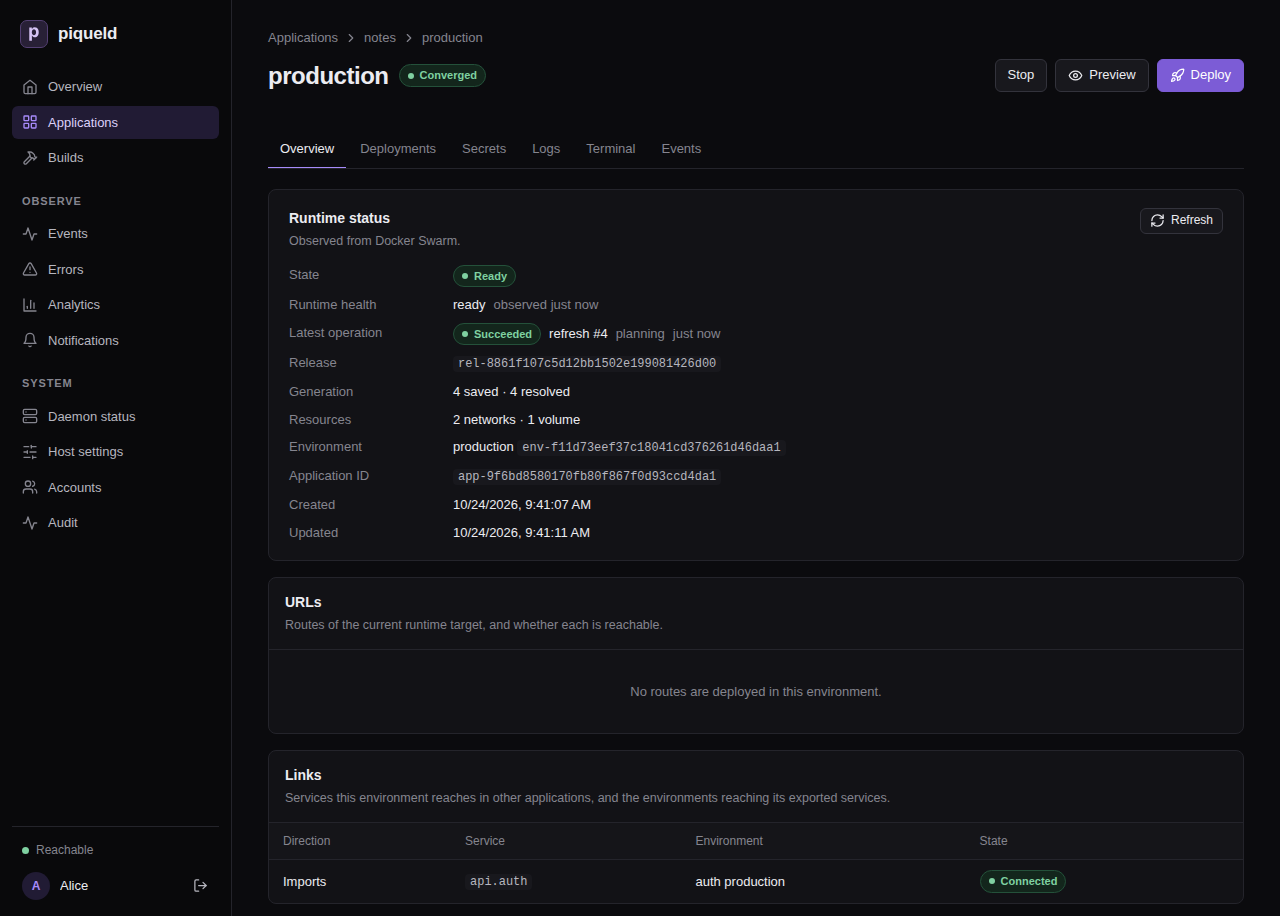
In the dashboard, the environment’s Overview has a Links card, which lists each import with its state.
With piquelctl:
$ piquelctl env show notes
production of notes (env-01a16d95420677219cf7b65149b4f7e8)
...
Import: api.auth from auth production: connected
The exporting side lists who imports its services, among the applications you may read:
$ piquelctl env show auth
...
Imported by: notes production: api
To try the connection, run a command in a service of notes:
$ piquelctl app exec notes web -- wget -qO- http://api.auth
Hostname: f09d400b7004
IP: 127.0.0.1
...
GET / HTTP/1.1
Host: api.auth
User-Agent: Wget
...
Choose which environment an import reaches
An import reaches the environment of the same name in the exporting
application: notes production reaches auth production. If notes also
had a staging environment, it would reach auth staging, and wait while
auth has none:
$ piquelctl env show notes staging
...
Import: api.auth from auth staging: waiting: not exported to this environment
To reach another environment, name it in the import: enter it under
Environment in the dashboard, add --environment production to
piquelctl app import add, or set environment in the manifest:
[[spec.imports]]
application = "auth"
service = "api"
+environment = "production"
environment can come from a variable,
so each environment
chooses its own.
An export grants every environment of the applications it lists, including
ones created later. Each environment of the exporting application exports what
it deploys: auth staging and auth production can export different
services.
Previews
An application whose manifest is in a Git repository can have
previews. A preview can import a service too, if the export
allows previews: check the export’s Previews too in the dashboard, add
--previews to piquelctl app export set, or set previews in the
manifest:
 [[spec.exports]]
 service = "api"
 applications = ["notes"]
+previews = true
Previews themselves never export.
A preview may then reach api in any environment of auth, production
included. Its name is its slug, such as notes-feat-login-3fa2c1, which no
environment of auth has, so name the environment previews reach, with a
variable. Name it in the import:
 [[spec.imports]]
 application = "auth"
 service = "api"
+environment = "${{ vars.auth_env }}"
Then add auth_env to your existing [spec.variables], and give previews
their own value:
[spec.variables]
auth_env = "${{ env.name }}"

[spec.previews.variables]
auth_env = "staging"
Environments reach the auth environment of their own name, and previews reach
auth staging.
What a link reaches
- Each link has its own network, which only the importing environment’s
services and the imported service join.
notescan’t reachauth’s other services, and two applications that import fromauthcan’t reach each other. - Every port the exported service listens on is reachable. Export services that only listen where importers should connect.
- The exported service can also reach the services of the importing environment on the link’s network, but only by address: they have no name there.
How a link changes
A link follows what both sides deploy, never what’s only saved. It goes away once either side deploys without it, or is deleted. The other side adjusts within seconds, without a deployment.
Each time a link connects or goes away, piqueld rolls out the imported service
and the importing services again, as for any change of network. Deployments
never wait for a link: until it connects, api.auth doesn’t resolve, so make
your services retry.
Renaming the exporting application changes the name its services answer to:
api.auth becomes api.<new name> once piqueld plans the link again. Update
the services of notes that use api.auth.
Troubleshooting
- The import is
waiting: not exported to this environment. No deployed environment of that name exports the service to this application. Check that the export lists the importing application, that the exporting side deployed it, and that the import reaches the right environment. A preview also needspreviews = true. - The import is
waiting: the exporter links to too many environments. An exporting environment links to at most 64 importing environments, the ones created first. An older environment that starts importing takes the link of the newest. - The name doesn’t resolve right after the link connects. piqueld then
rolls out
apionto the link’s network; wait until that ends. - A job can’t reach an import. A job can’t use a link on the deployment that adds it. Deploy the import first, then add the job.
- Validation fails with
export_service_missing. The export names a service that the application doesn’t have. - Validation fails with
export_duplicateorimport_duplicate. A service is exported twice, an application is listed twice in one export, or a service is imported twice. - Validation fails with
export_applications_empty. The export lists no application. Name at least one. - Validation fails with
link_count_excessive. An application declares more than 64 exports or imports, or an export lists more than 64 applications.
The manifest reference describes links in full, manifest settings lists their settings, and permissions who may set them up.