Running commands in a container
Run a one-off command in a running container of a service, such as a database
console or an administration task, from the dashboard or with piquelctl.
Before you start
- Your account needs the
apps:execpermission on the application. A command reaches everything its container can, including secret values, so grant it only to people you trust with those. - The service has a running replica.
- Run the commands on this page on the host, or on any machine where
piquelctlis signed in. You don’t need SSH access to the host. - The examples use
notes, from Configuring services.
Run a command
The command runs in one running replica of the service, as the container’s user, with its environment variables, secrets, volumes and network.
In the dashboard
- Open the environment, such as production on the
notesapplication’s Environments tab, then its Terminal tab. - Choose
dbas the Service, and fill in Command withpsql -U notes. It is/bin/shunless you change it. - Select Run.
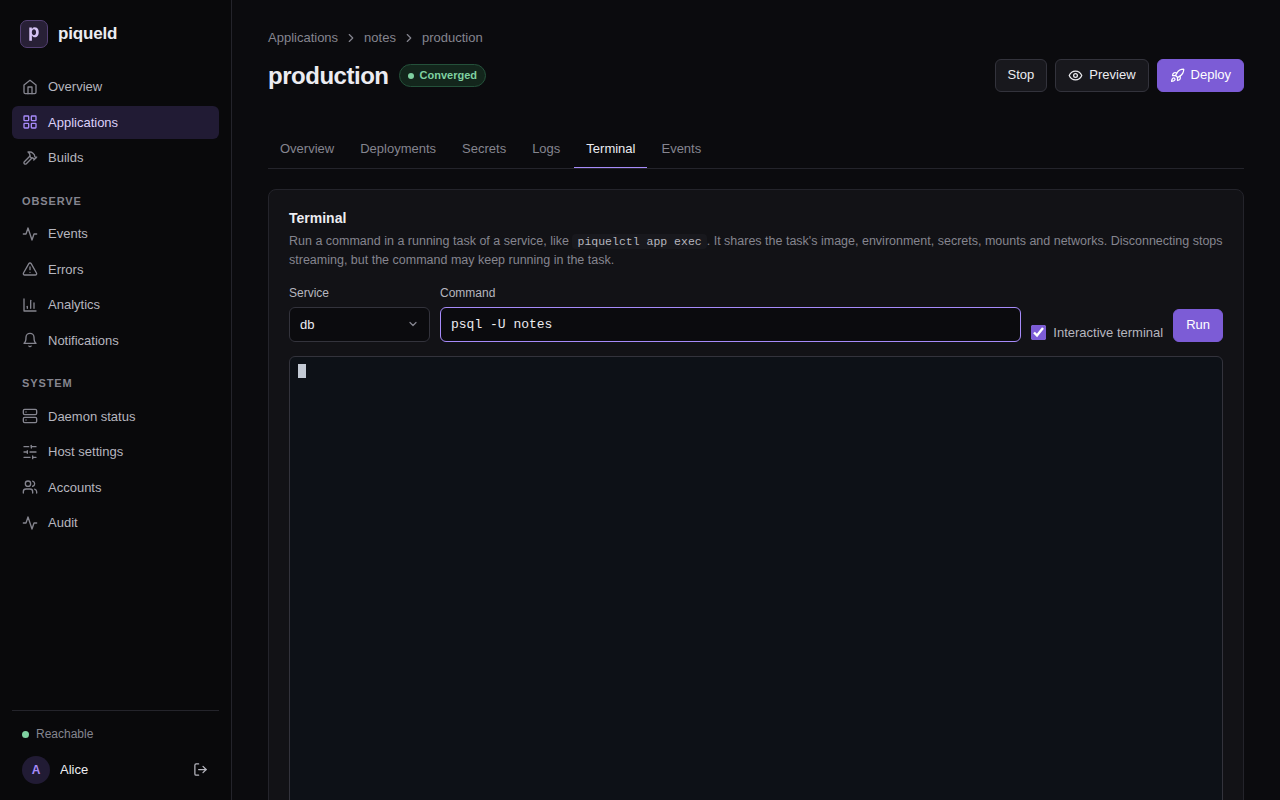
The command gets a terminal the size of the tab, so you can type, paste and use Ctrl-C. Uncheck Interactive terminal to run it without input instead. Once it ends, the tab shows its exit code.
The command line is split into arguments as a shell would, but no shell runs
it: to use pipes or variables, run one, such as sh -c 'ls | wc -l'.
Switching to another tab keeps the session. Disconnect, running another command, or leaving the page closes it.
With piquelctl
$ piquelctl app exec notes db -- psql -U notes -c "SELECT pg_size_pretty(pg_database_size('notes'))"
 pg_size_pretty
----------------
 7614 kB
(1 row)
Everything after -- is the program to run and its arguments. piquelctl
prints the command’s output as it comes, and exits with the command’s exit
code.
It runs without a shell. To use pipes or variables, run one:
piquelctl app exec notes db -- sh -c 'ls /var/lib/postgresql/data | wc -l'
When the application has several environments, name one with --env:
piquelctl app exec notes db --env staging -- psql -U notes -c 'SELECT version()'
Send input to the command
-i sends what you pipe to piquelctl to the command, such as a database
dump to restore:
piquelctl app exec notes db -i -- psql -q -X -v ON_ERROR_STOP=1 --single-transaction -U notes -f - notes < notes.sql
ON_ERROR_STOP and --single-transaction make psql stop at the first
error and keep nothing of the dump, instead of restoring part of it.
For an interactive program, such as a console or a shell, add -t too. It
gives the command a terminal, so you can type and use Ctrl-C:
piquelctl app exec notes db -it -- psql -U notes
piquelctl app exec notes web -it -- sh
-t needs piquelctl to run in a terminal itself, not in a script.
Run a command in a preview
In the dashboard, open the preview from the application’s Previews tab, and use its Terminal tab.
With piquelctl, preview exec runs a command in a preview. Name the
preview by its branch, its slug or its ID, and add --slot for a preview with
a slot. If notes read its manifest from Git and had a preview of branch
feat/login:
piquelctl preview exec notes feat/login web -it -- sh
What’s recorded
The environment’s history records each command, without the command line
itself, which may hold secrets: who started it, in which replica, and its exit
code. Open the environment’s Events tab in the dashboard to see them. To
see only commands, choose command started or command finished under
Event kind:
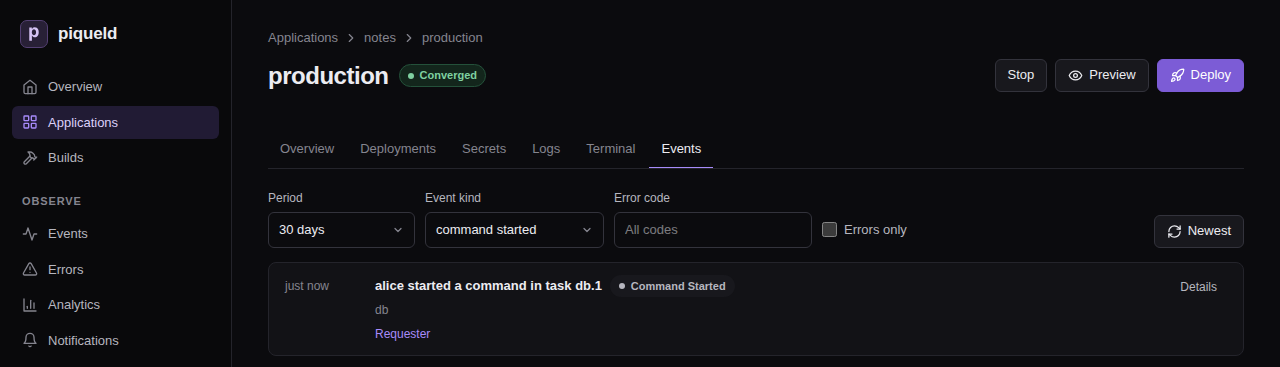
The audit trail also records the request.
If the connection drops
If piquelctl stops before the command ends, for example when you close its
terminal or lose the connection, the command keeps running in the container
until it ends on its own. So does a command you disconnect from in the
dashboard. The history then records that the command’s stream
failed, instead of its exit code.
To stop such a command, stop its process in the replica it runs in, which the
history names, such as db.1. A new command runs in one of the service’s
running replicas, not one you choose. So with several replicas, check with
ps that a new command reached the process before you kill it. On the
host, you can also find that replica’s container with docker ps, and run
kill in it with docker exec.
--timeout only limits how long piquelctl takes to start the command, not
how long the command runs.
If your access to the application is revoked while a command runs, the session ends, but the command may keep running.
Troubleshooting
service_not_running, or “Service has no running task” in the dashboard. The service has no running replica in that environment. Deploy it, or check its health.environment required. The application has several environments. Name one with--env.--tty requires standard input to be a terminal.-tonly works when you runpiquelctlin a terminal. In a script, use-i, or neither.executable file not found in $PATH. The image doesn’t have that program. Minimal images often have no shell at all, soshdoesn’t work there.permission_denied. Your account or token lacksapps:execon the application.not_found. Your account or token can’t read the application at all, or there is no application of that name.
Running commands describes how
app exec and preview exec work, and
piquelctl app exec lists
their options.