Permissions
Decide what each account, and each of its tokens, may do. You choose an
account’s grants when you invite it, and change
them on the Accounts page or with piquelctl account access.
Before you start
- To change someone’s grants, you need
accounts:manage, every grant their account holds, and every grant you give them; see who may manage accounts. - Run the
piquelctlexamples on the host, or on any machine wherepiquelctlis signed in with your account’s full access. A limited login or token can’t change grants.
Grants
A grant gives one permission, either on every application or only on the applications it lists. An account’s access is all of its grants together:
admin                          every ability, including permissions added later
admin on blog                  every application permission on blog
apps:deploy on blog, shop      deploy these two applications
previews:deploy on blog        create and deploy blog's previews, not blog itself
system:read                    installation-wide; never limited to applications
A grant on every application also covers applications created later. A grant on an application covers all its environments and previews, including ones added later.
Presets
Presets fill in common grants for you. piqueld only saves the grants a preset selected, not the preset.
| Preset | Grants |
|---|---|
read-only | apps:read, logs:read, events:read |
deploy | apps:read, apps:deploy |
developer | apps:read, apps:write, apps:deploy, secrets:write, logs:read, apps:exec, events:read: everything on applications except deleting them |
admin | admin |
On every application, read-only and developer also add system:read.
developer includes apps:exec, because someone who deploys their own
configuration can already reach everything a command in a container could.
Give an account access
- Open the account from the Accounts page. Under Access, select Edit grants.
- To limit the access to some applications, clear Application permissions apply to every application, including future ones, and select them.
- Choose a Preset, or select permissions one by one. Each permission shows what it allows.
- Select Save grants.
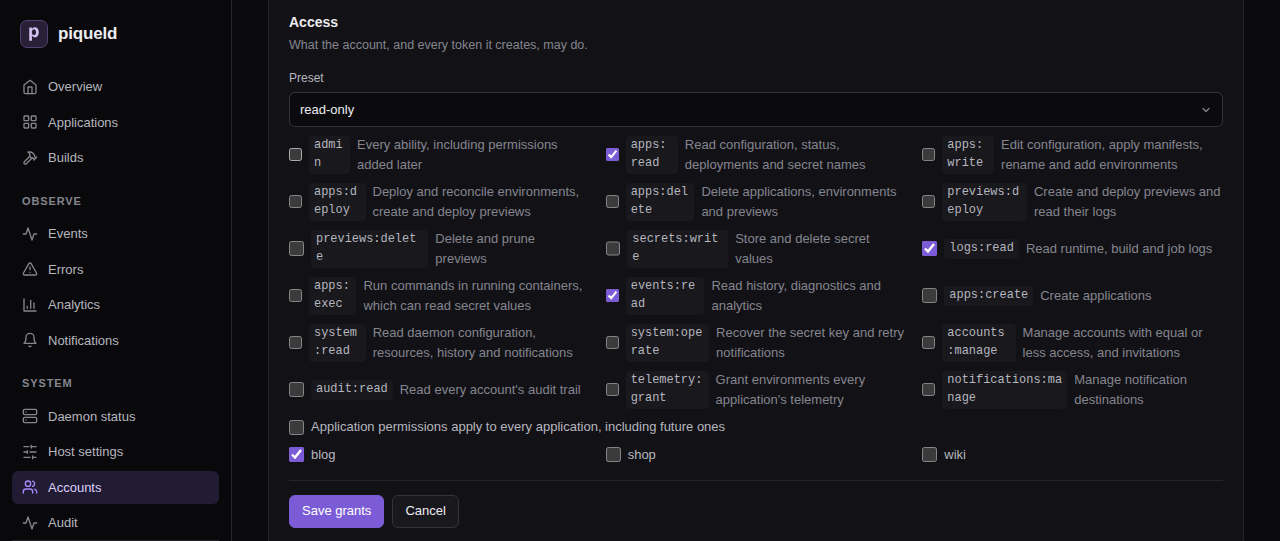
The applications you select apply to every
application permission.
Installation-wide permissions always apply
everywhere. Choose the applications before the preset: a preset adds
system:read when it covers every application at the moment you choose it.
With piquelctl:
$ piquelctl account access carol --preset read-only --app blog
Replace every grant of "carol"? [y/N] y
carol (01a16b4c-8584-7390-a0cb-b6b2c348ec20)
  apps:read on blog
  logs:read on blog
  events:read on blog
The new grants replace all the old ones. In a script, add --yes to skip the
confirmation. The same options choose the grants of invitations, tokens and
limited logins:
--presetstarts from a preset:read-only,deploy,developeroradmin.--permissionadds a permission, and can be repeated.--applimits the application permissions to an application, by name or ID, and can be repeated. Installation-wide permissions still apply everywhere.
For example, --preset deploy --permission secrets:write --app blog lets an
account deploy blog and change its secrets.
piquelctl account access
lists all its options.
Application permissions
These permissions can be limited to applications. Each one also lets its holder read the application, so a token that may only deploy can still follow its deployments.
| Permission | Allows |
|---|---|
admin | On the applications it lists: every permission in this table. On every application: everything, including the installation-wide permissions and permissions added in later versions |
apps:read | Reading configuration, environments, previews, releases, status, deployments, operations, builds and job runs, promotion plans, the push webhook’s address, and the names of secrets and which environments may mount them |
apps:write | Editing configuration, applying and planning manifests, renaming the application, adding and renaming environments, changing an environment’s branch or source, opting environments out of sync, and into it (with apps:deploy when the application deploys on push), and generating webhook secrets |
apps:deploy | Deploying, promoting releases into, restoring earlier deployments of, reconciling, stopping and starting environments, and everything previews:deploy allows. With apps:write, saving and deploying in one step, turning on deploying on push, or opting an environment into it |
apps:delete | Deleting the application, its environments and its previews |
previews:deploy | Creating, deploying and restoring previews, including from a local worktree, and reading their logs |
previews:delete | Deleting and pruning previews |
secrets:write | Storing, regenerating and deleting secret values, and choosing which environments may mount them |
logs:read | Reading runtime, build and job logs, which may contain sensitive output |
apps:exec | Running commands in running containers, with piquelctl app exec, preview exec and the dashboard’s Terminal tab. A command reaches everything its container can, including secret values |
events:read | Reading the application’s history, diagnostics and deployment analytics |
Installation-wide permissions
These permissions always apply to the whole installation.
| Permission | Allows |
|---|---|
apps:create | Creating applications; see who may create applications |
system:read | Reading the daemon’s configuration, installation checks, resources, history and diagnostics, notification destinations and deliveries, and DNS providers and certificates |
system:operate | Recovering from a lost secret key, retrying notification deliveries, and checking DNS providers |
accounts:manage | Managing other accounts and invitations; see who may manage accounts |
audit:read | Reading every account’s audit trail, and verifying its integrity. Everyone reads their own |
telemetry:grant | Granting and revoking an environment’s telemetry |
notifications:manage | Creating, changing, testing and deleting notification destinations. A destination can select any application, so this reveals every application’s notifications |
Every signed-in account may read the daemon’s status and readiness, and the
OpenAPI document, which names what each operation
needs in its x-piqueld-access extension: public, authenticated, or a
permission.
Let agents and CI manage previews
Agents and CI jobs that create, test and delete previews
need no access to your long-lived environments. Give them only the previews
permissions. On the dashboard, create a token
limited to blog, and select only previews:deploy and previews:delete. With
piquelctl:
piquelctl token create agent --app blog \
  --permission previews:deploy --permission previews:delete
This token can create and deploy previews of blog, including from a local worktree, read their logs, and delete and prune them, including previews created later. Like every application permission, it can read blog, including its environments’ status and deployments.
It can’t:
- deploy, promote into, reconcile, stop or delete blog’s long-lived environments, or read their logs
- change blog’s configuration, environments or secrets
- delete blog
Reconciling a preview needs apps:deploy. Running commands in a preview needs
apps:exec, which reaches the secrets previews mount. Reading history,
including a preview’s, needs events:read.
apps:deploy and apps:delete include the previews permissions, so people who
hold them can hand the previews permissions out. People who hold only the
previews permissions can’t hand out the others.
What people without access see
-
An application you can’t read doesn’t exist for you. It answers as not found (404), and it’s left out of lists, history, builds, analytics, the event stream, the routes in system readiness, and the preview counts in system status.
-
On an application you can read, a missing permission is refused with 403
permission_denied, naming the permission:$ piquelctl app logs blog Error: This action requires the logs:read permission (permission_denied) API code: permission_denied Request ID: 68e8a36a-6429-43c5-8311-f6866ffff09e Details: {"permission":"logs:read"} -
Applying a manifest with the name of an existing application you can’t read is refused with 403, rather than treated as a new application.
-
The daemon’s own history needs
system:read, and an application’s history needsevents:readon it. -
Events are numbered across the whole installation, so you can tell that events you can’t read happened, but not what they were or where.
-
The dashboard hides the pages, tabs and buttons you can’t use. On an application you can read but not change, without
apps:write, the configuration forms are read-only.
Who may create applications
Creating an application needs apps:create. You then get, on the new
application, every application permission you hold on some applications but
not all. For example, bob holds developer on blog and shop, and
apps:create. When he creates notes, he gets developer on notes too.
Permissions you hold on every application already cover it.
Creating and deploying in one step, or creating an application that
deploys on push, also needs
apps:deploy on some application. Applications created with an
API token or a
limited login give no new grants,
since those credentials never hand out lasting access.
Who may manage accounts
Everyone may manage their own account: edit its profile, add, rename and
remove its passkeys, see and revoke its sessions and tokens, create tokens for
it, lower its grants (with piquelctl account access), and delete it.
Changing another account needs accounts:manage and every grant that account
holds. This covers its profile, grants, passkeys, sessions and tokens,
enrollment links, and deleting it. You also only hand out grants you hold,
whether to an account or an invitation. So a team lead with developer
access and accounts:manage can manage developers but not administrators,
and administrators can manage each other. Anything beyond your own access is
refused with 403 permission_exceeded.
Invitation and enrollment links act with their issuer’s authority, checked
again when someone uses them. A link stops working if its issuer couldn’t
create it any more, for example after the issuer lost accounts:manage, or
the target account was given access beyond the issuer’s. Revoking a link needs
the same authority as creating it.
At least one account must keep admin on every application and a passkey.
Changes that would remove the last such account are refused with 409
account_lockout.
The host operator holds admin on every
application without being an account, so it doesn’t count, and these rules
apply to the changes it makes too. If every administrator still loses access,
it can create a new one. Revoking
a host operator browser session needs accounts:manage and admin on every
application.
Links between applications
Links are part of an application’s
configuration. Editing its exports or imports needs apps:write on it, and
deploying them needs apps:deploy, or previews:deploy for a preview’s
imports. Importing needs no permission on the exporting application: its
export, deployed by the people who may write it, is its consent. So:
- An export with
previews = truelets anyone who may deploy previews of an application it names reach the service. - An export naming an application that doesn’t exist yet goes to whichever application takes that name, and the exporter’s next deployment binds it to that application. When a named application is deleted, its name passes to the next application that takes it, from the exporter’s next deployment.
Link reports never reveal applications you can’t read. An import of a missing
environment and an import that isn’t exported to it both read unavailable,
and an environment’s importers only list applications you can read.
Telemetry
An environment granted telemetry gets the daemon’s traces, metrics and logs
from every application in its
receiving service.
So granting it can’t depend on that application’s own permissions: it needs
telemetry:grant and reading the application.
On the dashboard, select Grant telemetry on the environment’s
Overview tab. With piquelctl:
piquelctl env telemetry blog production on
No preset includes telemetry:grant. Only admin on every application holds
it, unless it’s granted on its own. Anyone who may write or deploy the
receiving application can then read every application’s telemetry, so grant
it only where they’re trusted with that.
Marking a service as the receiver is ordinary configuration, which needs
apps:write, and does nothing until the environment is granted. Revoking
with off stops the export at once. The telemetry status in
piquelctl status and on the dashboard’s Daemon status only lists the
receivers of applications you can read.
When access changes take effect
piqueld checks grants on every request, so a change applies at once to every session and token of the account. Changes also check your access again just before they’re saved, so a change already under way when access is removed or revoked can’t use the access it lost.
Connections that stay open check again while they last: event streams, and
commands started with apps:exec. They notice a grant change, an account
deletion or a revoked credential within a second. They notice everything else
within about 30 seconds, such as an expired credential, a token left without
grants by its application’s deletion, or a tailnet device that no longer
matches a token’s binding.
For a token bound to tailnet devices, each of these checks first looks the
device up again on the tailnet, which can add up to 10 seconds. If the
lookup doesn’t answer in time, the connection ends with
tailnet_unavailable.
- An event stream stops sending history you may no longer read. When you lose
access entirely, it ends with an
access_endedmessage. - A command that lost access ends with the refusal, such as 401, 403 or 404. As with a disconnect, the command itself may keep running in its container.
Both also end when the daemon shuts down.
Troubleshooting
- A request is refused with
permission_denied. Your account, or the token you used, lacks the permission indetails.permission. Ask someone withaccounts:manageto grant it. - An application you expect is “not found”. You can’t read it. Any permission on it lets you read it.
- You created an application and can’t see it. Your only permission is
apps:create, and the new application only gets the application permissions you hold elsewhere. Ask an administrator for access to it. - A request is refused with
credential_scoped. API tokens and limited logins can’t create credentials, hand out access, or change their own account. Use a fullpiquelctl loginor the dashboard. - A change is refused with
permission_exceededoraccount_lockout. See managing accounts.