Signing in from the CLI and automation
Sign piquelctl in, keep several accounts signed in, and give scripts, CI
jobs and agents an API token that can only do what they need.
Before you start
-
You have an account with a passkey.
-
The commands on this page run on your machine. They reach the daemon at the dashboard’s address, which you give
piquelctlonce per shell:export PIQUELD_URL=https://piqueld.<tailnet>.ts.netTo keep the address for good, save it as a connection profile.
Sign piquelctl in
$ piquelctl login
Open https://piqueld.<tailnet>.ts.net/dashboard/auth#device=KQ7M-3XHT
Check the page shows code: KQ7M-3XHT
The daemon sees this login coming from: 100.101.102.103
Waiting for passkey login…
alice (01a16b4b-ef93-7971-b6f6-e8359d3c4d52)
Open the link, sign in with your passkey, and approve the login. The link
already carries the code, so you never have to type or copy the code:
creating your account
walks through it. piquelctl then prints the account it signed in as. This
works over SSH too, since the browser can run on another machine than the
terminal.
Anyone who can reach the daemon can start a login, and approving it gives their terminal your account’s access. Only approve a code from a terminal you started yourself, whose address matches Requested from. Behind your own reverse proxy, every login shows the proxy’s address: check that the code is the one your terminal printed. Approving a login never creates an account: new people need an invitation first.
On the daemon’s host, root and the daemon’s user need no login: they act as the host operator.
Check who you’re signed in as:
$ piquelctl whoami
alice (01a16b4b-ef93-7971-b6f6-e8359d3c4d52)
  admin on every application
The login lasts 30 days. Then run piquelctl login again.
Ask for less access
A login can do less than your account, which suits a shared or less trusted machine:
piquelctl login --preset read-only
--preset, --permission and --app choose the access, as in
give an account access. Here, --app
only takes application IDs, such as app-01a16b4c59db7202b51fefb283dee86b,
which piquelctl app list prints: names can’t be looked up before you’re
signed in.
The approval page shows the access asked for under Access, and you can
only approve access you hold. whoami then shows limited credential next to
your account. Like a token, a limited login
can’t create credentials.
Sign in over plain HTTP
piquelctl refuses to send credentials to a remote daemon over plain HTTP. If
something else already encrypts the connection, such as Tailscale, allow it
with --allow-insecure-http, on every command:
piquelctl --allow-insecure-http --url http://<tailnet-host>:7845 login
This doesn’t encrypt anything itself. HTTPS, localhost and the daemon’s Unix
socket need no flag. Passkeys still only work at the dashboard’s HTTPS
address.
Saved logins
login saves its credential in $XDG_CONFIG_HOME/piqueld/credentials.json,
by default ~/.config/piqueld/credentials.json, which only you can read. Set
PIQUELD_CREDENTIALS_FILE to use another file. Connection profiles never
hold credentials.
Logins are saved per daemon address and account. The daemon’s Unix socket and
its network address count as different addresses, and so do two spellings of
one address, such as localhost and 127.0.0.1. Your most recent login is
the default for its address. To use another saved account, add --account
with its username or ID:
$ piquelctl --account carol whoami
carol (01a16b4c-8584-7390-a0cb-b6b2c348ec20)
  apps:read on blog
  logs:read on blog
  events:read on blog
--account matches the username exactly as it was when you logged in. When
you rename an account with
piquelctl account update, its saved login on
that daemon is renamed too. After a rename on the dashboard, select the login
by ID, or log in again.
piquelctl logout revokes the login and removes it from the file. With
--account, it signs that account out.
piquelctl also creates credentials.json.lock next to the file. Don’t
delete it while login or logout is running.
Create an API token
A token lets a script act as your account without a passkey. It acts with its own grants, limited on every request by your account’s current access: lowering your access lowers your tokens’ access too.
- On the Accounts page, open your own account, then its Access tab, and select New token under Sessions and API tokens.
- Choose the token’s access: clear Application permissions apply to every application, including future ones and select applications to limit it, then choose a Preset or permissions. Effective access shows what the token will be able to do.
- Enter a New token name, such as
ci. - Under Expires in days (blank: never), keep
90or enter another number of days. - Select Create token.
- At the top of the page, select Copy next to the new token, then Done. The token isn’t shown again.
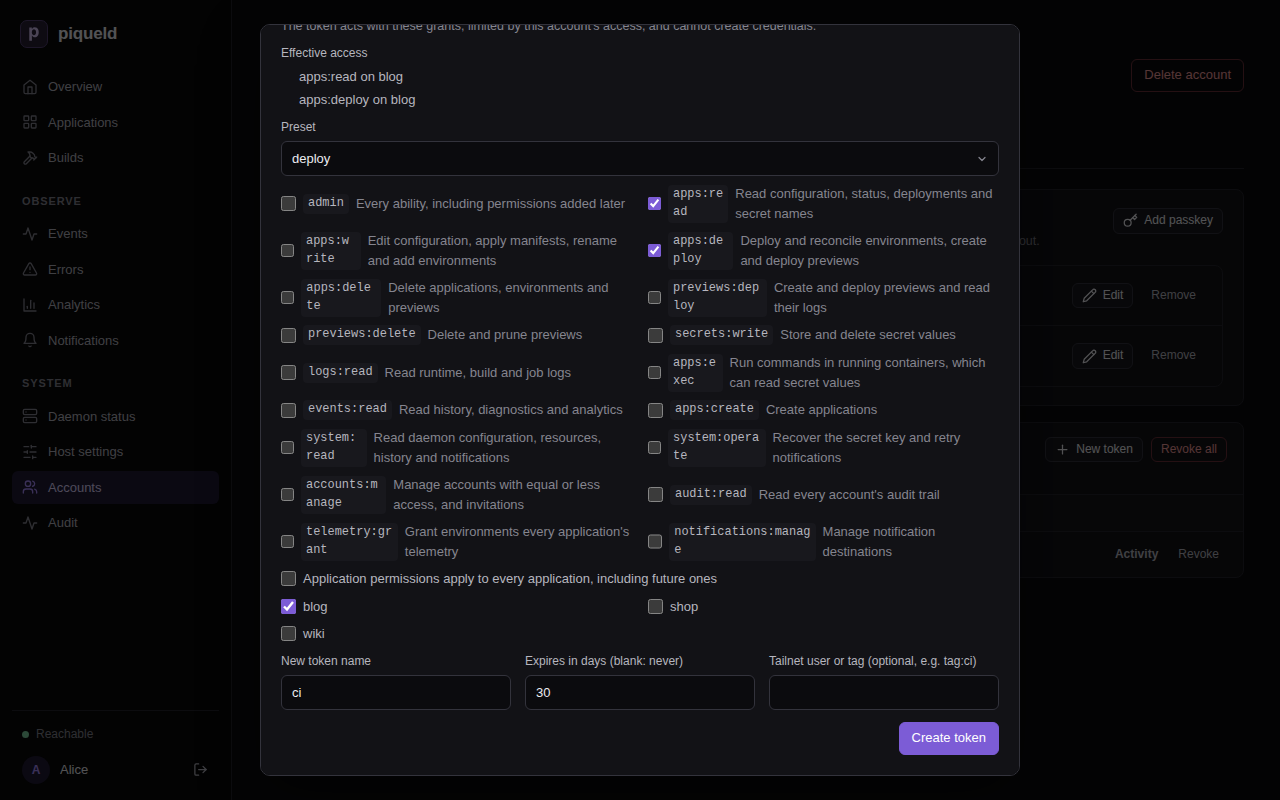
With piquelctl:
$ piquelctl token create ci --preset deploy --app blog --days 30
pqd_0UJj…
It prints the token, which starts with pqd_ so that secret scanners can find
leaked ones. piqueld only keeps a hash of it.
--preset,--permissionand--appchoose its access, from the access you hold.--dayssets its lifetime, 90 days by default.--no-expirymakes it last until you revoke it.
piquelctl token create
lists all its options.
The daemon’s auth.max_token_days
setting can limit how long new tokens last. With a limit, tokens without
expiry are refused, and so are tokens that outlive it.
What tokens can’t do
Tokens, and limited logins, can’t create credentials: no tokens, passkeys, invitations, enrollment links or CLI login approvals. They can’t give anyone access, and they can’t change their own account. They can revoke themselves. So a leaked token never outlives or exceeds its own limits.
Without accounts:manage, a token only sees itself.
piquelctl account list shows its account with the token’s own access, and
piquelctl token list shows the token alone. Your passkeys and your other
sessions and tokens stay hidden from it.
A token with accounts:manage can still edit other accounts’ profiles and
passkeys, revoke their sessions and tokens, and delete them, within its
access. It can’t change their grants.
Use a token in automation
Give the token to the script in PIQUELD_TOKEN, from your CI’s secret store:
export PIQUELD_URL=https://piqueld.<tailnet>.ts.net
export PIQUELD_TOKEN=pqd_…
piquelctl app deploy blog --yes
PIQUELD_TOKEN takes precedence over saved logins. Don’t put tokens in
connection profiles or in your Nix configuration. HTTP API clients send it as
Authorization: Bearer pqd_….
With PIQUELD_TOKEN set, piquelctl logout revokes that token and leaves
saved logins alone.
Bind a token to tailnet devices
When piqueld has its own tailnet node, or a dashboard hostname, you can bind a token to a tailnet user or tag. A leaked CI token is then useless outside your tailnet’s CI runners.
On the dashboard, fill in Tailnet user or tag (optional, e.g. tag:ci) when you create the token. Its row then shows Only from tailnet tag:ci.
With piquelctl, add --tailnet:
piquelctl token create ci --preset deploy --app blog --tailnet tag:ci
piquelctl token create laptop --preset read-only --tailnet [email protected]
piqueld then accepts the token only through its tailnet node, or that
hostname, from a device signed in as that user or carrying that tag. It checks
on every request, and again when a command started with app exec begins, so
removing a tag or signing a device out takes effect at once. Anywhere else,
including the Unix socket and other devices, the token is refused with 401
tailnet_binding_mismatch, and the refusal is recorded in the
audit trail.
Tagged devices belong to no user, so a user binding never matches them: bind their tokens to a tag. Logins can’t be bound.
Revoke a token
On the dashboard, select Revoke next to the token, under Sessions and API tokens on your account’s Access tab.
With piquelctl, list your sessions and tokens, then revoke one by its ID:
$ piquelctl token list
…
01a16b4c-3504-7053-b78f-e68736555bdf cli piquelctl (expires at Unix 1795393518)
  the account's full access
…
01a16b4e-6995-79b2-bfb1-0f72630a4d96 token ci (expires at Unix 1795393663)
  apps:read on blog
  apps:deploy on blog
$ piquelctl token revoke 01a16b4e-6995-79b2-bfb1-0f72630a4d96
Info: revoked 01a16b4e-6995-79b2-bfb1-0f72630a4d96
Your logins are listed as piquelctl, and browser sessions as Browser.
Deleting an application removes every grant on it. A token or limited login
left with no grant at all can do nothing, and expires a minute later. That
minute lets piquelctl app delete, run with such a token, see the
deletion finish.
How long credentials last
| Credential | Lasts |
|---|---|
| Browser session | 7 days, or until it goes 24 hours unused |
piquelctl login | 30 days |
| API token | 90 days by default; any number of days, or no expiry, within auth.max_token_days |
| Host operator browser session | 12 hours |
piqueld never renews a credential. When one expires, sign in again or create a new token.
Troubleshooting
- “remote HTTP authentication requires HTTPS or an explicit insecure HTTP
opt-in”. Use the dashboard’s HTTPS address, or
--allow-insecure-http. - “–app “blog” must be an application ID when signing in“. Pass the ID
from
piquelctl app listinstead. - Approving a login is refused with
permission_exceeded. The login asks for access your account doesn’t hold. Start it again with less access. - “login expired; run piquelctl login again”. The code is valid for 10
minutes. Run
piquelctl loginagain. - Starting a limited login fails with
request_body_too_large. The access it asks for is over 16 KiB, which fits a preset on a few dozen applications. Ask for every application instead of listing them. - “token lifetime exceeds this installation’s auth.max_token_days”. Pass a
--dayswithin the limit. The limit also applies to the default 90 days. - Creating a bound token answers “tailnet bindings need the daemon’s tailnet node (tailscale.enabled) or a dashboard hostname (ingress.private.dashboard_hostname)”. Turn on piqueld’s tailnet node or set a dashboard hostname.
- A bound token is refused with
tailnet_binding_mismatch. Use it through piqueld’s tailnet address, from a device with that user or tag.tailnet_unavailable(503) meanstailscaleddidn’t answer in time: retry. - “credentials file must be readable only by its owner (chmod 600)”. Run
chmod 600on the credentials file. - “the daemon predates limited tokens” or “it predates limited logins”.
The daemon is too old to limit access, so
piquelctlrefuses rather than getting full access. Upgrade it.