Private routes on your tailnet
A private route serves a hostname, such as admin.example.com, only to the
devices on your tailnet, your private Tailscale
network. Elsewhere, connections to it fail. Use private routes for admin
tools, staging environments and previews. Routes are private unless you make
them public.
piqueld serves them through a second tailnet device, the apps node, named
piqueld-apps by default. Your private hostnames’ DNS records point at its
tailnet addresses, and it passes their connections on to the gateway. It is
separate from piqueld’s own tailnet node,
so you can give it its own tags and access rules.
Before you start
- The gateway is enabled; see Serving an application over HTTPS.
- A tailnet, and permission to add a device to it.
- A DNS provider for your domain, Cloudflare or OVH. The certificate authority can’t reach a private route, so piqueld gets its certificates through the provider; see DNS-01 certificates.
- Run
piquelctlon the host, or on any machine where it is signed in.
Set it up
-
In the Tailscale admin console, create an auth key for the apps node, and give it a tag. Your tailnet’s access rules can then control who reaches your private routes, and the node’s key doesn’t expire.
-
Save the key in a file only root can read, such as an agenix or sops-nix secret. The node uses it only to join the tailnet the first time.
-
Enable private routes in your configuration, with your DNS provider:
services.piqueld.settings = {
  ingress.enabled = true;
  ingress.private = {
    enabled = true;
    hostname = "piqueld-apps";   # piqueld-apps.<tailnet>.ts.net
    auth_key_file = "/run/secrets/piqueld-apps-ts-auth-key";
  };
  dns.providers = [
    {
      kind = "cloudflare";
      api_token_file = "/run/secrets/cloudflare-dns-token";
    }
  ];
};
In
/etc/piqueld/config.toml, pass the files to the service withLoadCredential=, as for the tailnet auth key:[ingress] enabled = true [ingress.private] enabled = true hostname = "piqueld-apps" auth_key_file = "ts-apps-auth-key" [[dns.providers]] kind = "cloudflare" api_token_file = "cloudflare-dns-token"hostnameis the node’s name on the tailnet: one DNS label, different from the name of piqueld’s own node. The[ingress.private]settings describe each one. -
Restart the daemon. On NixOS, rebuild the system. Elsewhere, reload the unit you edited first:
sudo systemctl daemon-reload sudo systemctl restart piqueld -
On the host, check that the node joined the tailnet, and note its addresses:
$ sudo piquelctl status
...
Private listener: apps node piqueld-apps.<tailnet>.ts.net (Running, 100.101.102.103, fd7a:115c:a1e0::5a01:4c3d)
...
In the dashboard, System status shows the Private listener card as Ready, with the same name and addresses.
-
For each private hostname, create an A record to the node’s IPv4 address, and an AAAA record to its IPv6 address. If piqueld manages your DNS records, it creates them.
-
Add a route, as in Add a route, but leave it private, then deploy:
-
In the dashboard’s Routes tab, Visibility is Private unless you change it.
-
With
piquelctl,app route addmakes private routes by default:piquelctl app route add notes admin.example.com admin 3000 --deploy -
In the manifest, leave out
visibility:[[spec.routes]] hostname = "admin.example.com" service = "admin" port = 3000
-
The apps node’s identity lives in piqueld’s data directory, under
ingress/tailscale, so back it up
whole. Without it, the node joins the tailnet as a new device, with new
addresses.
Check that it works
In the dashboard, the application’s Routes tab lists the route in
Deployed routes. With piquelctl:
$ piquelctl app route list notes
HOSTNAME  NAME  ENVIRONMENT  VISIBILITY  STATE  DESTINATION  DNS  RECORDS
admin.example.com  -  production  private  ready  admin:3000  manual  A/AAAA -> 100.101.102.103, fd7a:115c:a1e0::5a01:4c3d
ready means the hostname resolves to exactly the node’s addresses, and that
the gateway serves the route with a trusted certificate. piqueld checks this
from the server, without crossing the tailnet.
From a device on your tailnet, open https://admin.example.com: your service
answers, and sees the device’s tailnet address in X-Forwarded-For. From a
device off the tailnet, the connection fails. On your server’s public address,
plain HTTP for the hostname gets a 404, and HTTPS fails, since the gateway has
no certificate for it there. If a public wildcard route covers the hostname,
HTTPS connects with the wildcard’s certificate and also gets a 404.
Make an environment’s routes private
An environment can cap the visibility of its routes. To keep staging off the
internet, whatever its routes say:
-
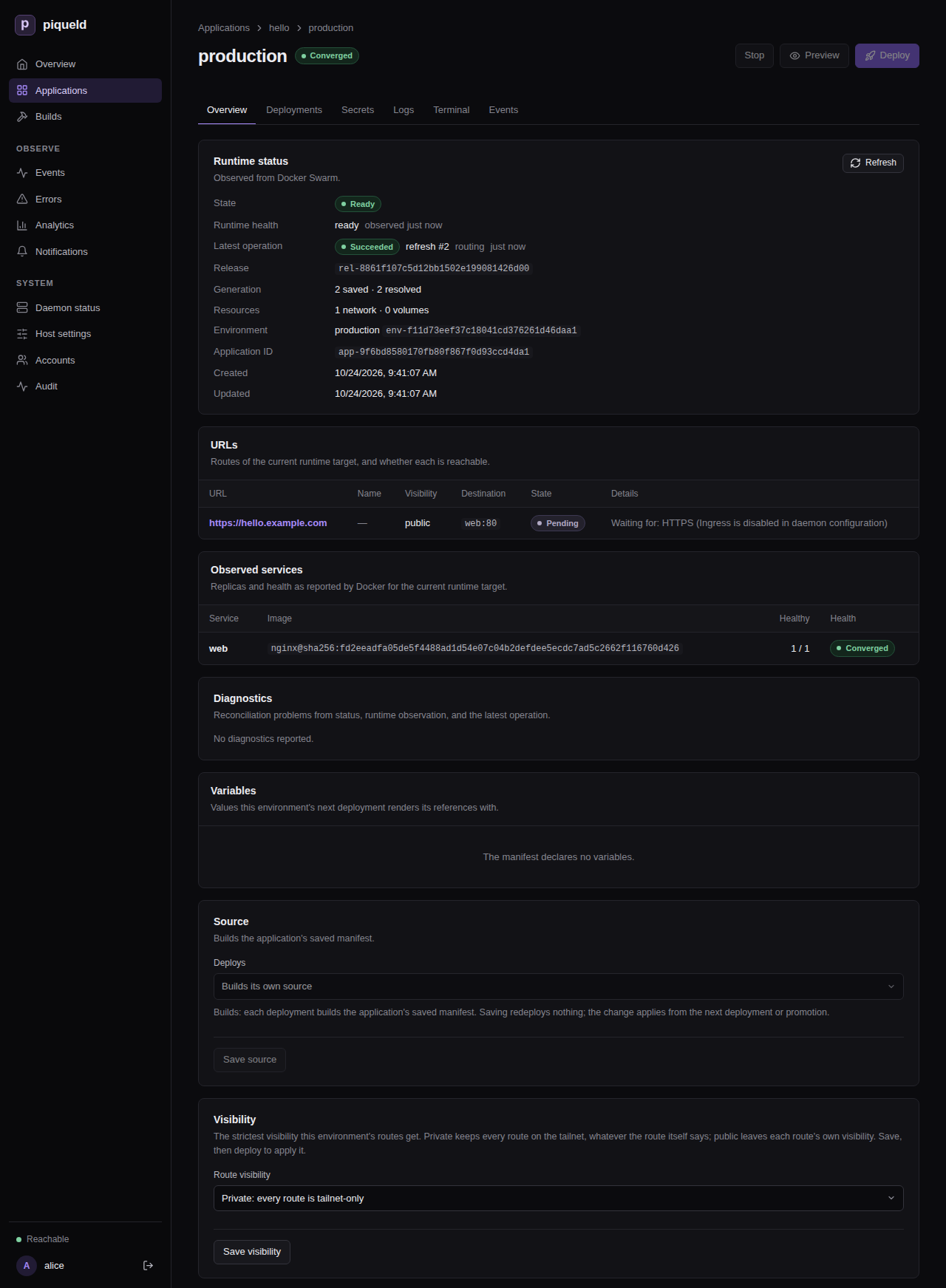
In the dashboard, open the environment’s Overview. In its Visibility card, set Route visibility to Private: every route is tailnet-only, then select Save visibility.
-
With
piquelctl, useenv visibility:piquelctl env visibility notes staging private -
In the manifest:
[spec.environments.staging]
visibility = "private"
Deploy the environment to apply it. A promoted environment applies it once its source records a new release and you promote it.
Each route gets the stricter of its own visibility and the environment’s, so a
cap can make a route private, but never public. Environments default to
public, which restricts nothing. Previews default to private; set
[spec.previews] visibility to change it, as
previews describes.
For example, with these routes:
[spec.variables]
domain = "piquel.fr"

[spec.environments.production]

[spec.environments.staging]
visibility = "private"

[spec.environments.staging.variables]
domain = "staging.piquel.fr"

[[spec.routes]]
hostname = "${{ vars.domain }}"
service = "web"
port = 3000
visibility = "public"

[[spec.routes]]
hostname = "admin.${{ vars.domain }}"
service = "admin"
port = 3000
| Environment | Hostname | Reachable from |
|---|---|---|
| production | piquel.fr | the internet |
| production | admin.piquel.fr | your tailnet |
| staging | staging.piquel.fr, admin.staging.piquel.fr | your tailnet |
Change a route’s visibility
Making a route private doesn’t close the connections already open. WebSockets opened from the internet stay open for up to five minutes after the change. Other responses already in progress, such as server-sent events or long downloads, continue until they end. To revoke their access at once, have your application end those connections itself.
In the dashboard, change the route’s Visibility on the Routes tab, select Save changes, then Deploy to <environment>.
With piquelctl, change it with
app route visibility,
and deploy:
piquelctl app route visibility notes admin.example.com public --deploy
In the manifest, change the route’s visibility, then deploy it with
piquelctl app apply --file notes.toml --deploy.
When you deploy, a route made private stops serving new requests from the internet once piqueld updates the gateway’s routes. That happens after the deployment prepares its sources and runs its before-rollout jobs, and before it rolls out the services. A deployment that fails before then leaves the route public. A route made public is published once its service is ready. Its DNS records must change too: you update the records piqueld doesn’t manage, and piqueld updates the ones it manages once the gateway has the new routes. It may delete and recreate them on the way, and cached answers can delay the change.
DNS for private routes
- A wildcard record per environment saves work. With A and AAAA records
for
staging.example.comand*.staging.example.com, every new staging route already has its DNS. - Names aren’t secret. Private hostnames appear in public DNS, and in certificate transparency logs unless a wildcard certificate covers them. Only who can connect is restricted.
- Some routers drop DNS answers for tailnet addresses. Their DNS-rebinding
protection refuses answers in
100.64.0.0/10. Allow your domain in the router’s settings, or use Tailscale’s split DNS.
Serve the dashboard on your own domain
The dashboard and API are normally served at piqueld’s own address, such as
https://piqueld.<tailnet>.ts.net. You can serve them on your own domain
instead, through the apps node. Like a private route, the hostname is then
only reachable from your tailnet, and gets its certificate through your DNS
provider. Applications can’t route it, or any name below it.
Switching breaks your passkeys. The dashboard only works at the address
auth.public_url names, so leave it unset or set it to
https://dashboard.example.com. A passkey only works at the address it was
created on, so the passkeys you have stop working, at the old address too.
The steps below add a new one.
-
Sign
piquelctlin with your account. The host operator can’t create enrollment links. -
Set the hostname in your configuration, with private routes enabled:
services.piqueld.settings.ingress.private.dashboard_hostname = "dashboard.example.com";Or, in
config.toml:[ingress] enabled = true [ingress.private] enabled = true dashboard_hostname = "dashboard.example.com" -
Rebuild the system, or restart the daemon.
-
Create A and AAAA records for the hostname to the apps node’s addresses, as for a private route. If piqueld manages your DNS records, it creates them.
-
Create a link that adds a passkey to your account:
piquelctl account enroll alice -
Open the link on a device on your tailnet, and save the new passkey.
If no CLI login works any more, recover administrator access.
If you run piqueld’s own tailnet node ([tailscale]), it keeps serving the
API at its address, for piquelctl. piquelctl status then reports
Tailnet problem: auth.public_url is not https://piqueld.<tailnet>.ts.net, so passkeys do not work on this origin,
and the Tailnet node installation check
warns the same. Both are expected. Otherwise, run sudo piquelctl on the host, over the
daemon’s Unix socket.
The audit trail records the tailnet
user of each request, and
tailnet-bound tokens work
on this hostname. For both, piqueld needs the tailscale command on its
PATH. The NixOS module adds it; on other distributions, install Tailscale on
the host.
Troubleshooting
- Private routes are
disabledwithPrivate ingress is disabled in daemon TOML ([ingress.private]). Enable[ingress.private]and restart. The apps node needs login. The node has no auth key, its auth key expired before its first login, or, without a tag, its node key expired. The daemon logs a login URL: open it, or setauth_key_fileand restart.- A route is
failedwithNo DNS-01 certificate. The rest of the message says why.no configured DNS provider zone contains …means no provider covers the zone. Anything else is the latest issuance error; see renewal and failures. Private HTTPS is not verified yet. Check that the hostname’s A and AAAA records point at the apps node’s addresses, and nothing else.Swarm address pool <pool> overlaps the tailnet ranges. Your Swarm was set up with custom address pools. Docker gives application networks addresses from them, which piqueld can’t tell apart from tailnet devices, so it keeps private routes off until the Swarm’s pools are outside100.64.0.0/10andfd7a:115c:a1e0::/48.- Devices on the tailnet can’t resolve the hostname. Check your router’s DNS-rebinding protection.
- The daemon doesn’t start, with
ingress.private.dashboard_hostname requires ingress.enabled and ingress.private.enabled. Enable both, as in Set it up. To turn the gateway off, first move the dashboard off it.