Audit trail
See who did what through piqueld’s API, and check that nobody rewrote that record.
Before you start
- Every account can read its own requests, and API tokens and limited CLI
logins only their own. Reading anyone else’s, and checking the chain, needs
the
audit:readpermission, which an account withadminon every application has. - Run the
piquelctlcommands on the host, or on any machine wherepiquelctlis signed in.
What it records
The audit trail records:
- every request piqueld refused, for a missing credential or permission, a rejected browser origin, or too many attempts. Requests for an application the caller can’t see are Denied with status 404;
- every change and every sign-in;
- every session that runs a command in a container, with
app exec,preview execor the dashboard’s Terminal tab. The command itself isn’t recorded, since it can contain secrets; - reads of logs, of the daemon’s configuration, of downloaded manifests, and of the account list.
Each record keeps the request and its outcome: Allowed, Denied or Failed. It names the account and credential that made it, and where it came from: a network address, the Unix socket, or a tailnet user and device. Request bodies are never recorded, but a change to an account names what changed, such as the grants it set. Records outlive the accounts, credentials and applications they name.
Routine reads, such as the dashboard refreshing a page, aren’t recorded. Records are written in the background. If too many wait at once, or one can’t be written, it’s lost: the next record written then follows a Failed one, with status 503 and no caller, that says how many are missing, so the trail shows the gap.
Read it
The dashboard’s Audit page lists the trail, newest first, and filters it by outcome. On the Accounts page, each session and token’s Activity link shows its requests.
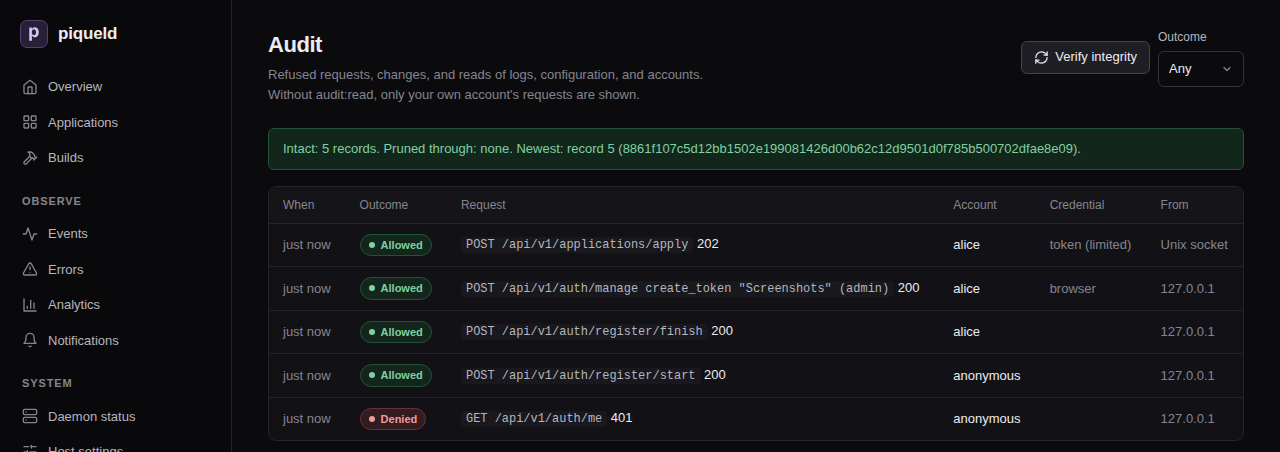
With piquelctl:
$ piquelctl audit --limit 3
1792797893351  allowed  200 GET /api/v1/environments/{id}/logs on environment env-01a16b1282cf755287920502b5793cd2  host operator (uid 1000)  unix socket
1792797804727  allowed  200 POST /api/v1/auth/login/operator  host operator (uid 1000)  ::1
1792797775115  denied  401 GET /api/v1/auth/me  anonymous  ::1
Next cursor: v1:5
To see only refused requests, or only those of one session or token:
piquelctl audit --outcome denied
piquelctl audit --credential <credential-id>
piquelctl token list shows your own tokens’ IDs. A request about an
environment names its ID, which piquelctl env list <application> shows.
The audit trail belongs to the whole installation, not to an application, so the manifest has no part in it.
Check that nobody changed it
Each record is linked to the one before it by a hash, so editing, inserting or removing a record breaks the chain from that point on. To check the chain, select Verify integrity on the Audit page, or run:
$ piquelctl audit verify
Chain: intact
Records checked: 7
Pruned through: none
Newest: 7 7a625b7a247a086b8e1f4724ff7595dffdfa117145f79e52b881f30a667bc402
If the chain is broken, the command fails and names the first record that doesn’t match; the change may also be just before it.
The chain can’t tell who wrote the database. Someone who controls the host could rewrite the whole trail, or delete its newest records. To catch the latter, keep the Newest line somewhere piqueld can’t change, such as a ticket or a scheduled job’s log. If a later check reports a lower Newest record than the one you kept, records were removed.
How long it’s kept
retention.audit_days keeps records for 365 days by default; 0 keeps them
forever. Pruning only removes old records while the chain through them is
intact, so it never erases evidence of tampering. Pruned through then names
the last record removed, which the remaining chain starts from.
Get alerted
The security notification category reports, as they
happen:
| Event | When |
|---|---|
admin_granted | An account receives admin on every application: through a grant change, an invitation, the first account, or a recovery link |
privileged_token_created | An API token is created without an expiry date, or with admin |
admin_recovery_issued | piquelctl recover-admin issued a recovery link |
operator_sign_in_issued | piquelctl sign-in-link issued a link that signs a browser in as the host operator |
access_denial_burst | 20 requests from one address and account are refused within a minute (then at most every 10 minutes while it lasts) |
credential_new_address | A session, CLI login or token is used from a network address it hasn’t used before (IPv6 by /64). Its first address, and the Unix socket, don’t alert |
secret_key_recovered | The secret key was recovered, discarding stored values |
notification_destination_changed | A notification destination was created, changed, disabled, enabled or deleted. A destination whose URL or kind changed doesn’t receive it, as it’s a new receiver |
An unexpected admin_recovery_issued or operator_sign_in_issued means
someone with root, or the daemon’s user, is acting on the host: treat it as a
host compromise.
Troubleshooting
- You only see your own requests, or verifying is refused. Both need
audit:read. piquelctl audit verifyfails. The database was changed outside piqueld. Compare the first mismatching record, and the records just before it, with your backups.