Notifications
Get a message in Discord, or a JSON webhook of your own, when a deployment fails, a service degrades, or someone gains administrator access.
Before you start
- You need the
notifications:managepermission to add and change destinations. Seeing them needs it orsystem:read. Reading the delivery history needssystem:read, and retrying a deliverysystem:operate. Administrators have all three; see permissions. - A webhook URL: a Discord channel’s webhook, or an endpoint of your own that
accepts JSON. It must use HTTPS, except to
localhostor a loopback IP address. - Run the
piquelctlcommands on the host, or on any machine wherepiquelctlis signed in.
Add a destination
The webhook URL is a credential: anyone who has it can post to your channel. piqueld stores it encrypted, and never shows it again.
Destinations belong to the whole installation, not to an application, so the
manifest can’t set them: use the dashboard or piquelctl.
In the dashboard:
- On the Notifications page, select Add destination.
- Enter a Name, such as
ops, choose its Kind, and paste the Webhook URL. The form also chooses what it receives. - Select Save destination, then Test on its row to send a test notification.
With piquelctl:
-
Create the destination, then paste the webhook URL and press Ctrl-D:
piquelctl notification set ops --kind discord --url-stdinopsis its name. The URL is read from standard input rather than the command line, so it stays out of your shell’s history. -
Send a test notification:
$ piquelctl notification test ops
ops acknowledged the test notification.
A new destination receives every category but successful deployments, about every application, without previews.
In Discord, each notification shows as a card coloured by category, such as red for failures and green for recoveries. It names the application, environment and branch, with the cause and next step of a failure, and links to its page or diagnostic in the dashboard.
Choose what it receives
Each destination picks:
- its categories, from the table below. Each can carry a message of up to 1000 characters, added to its notifications. In Discord, that text is the message, so mentions in it notify people.
- the applications it’s about: every application, including later ones, or some, which stay selected when renamed. Daemon notifications, such as security events, reach every destination, whatever its applications.
- whether it covers previews.
| Category | Dashboard label | Sent when |
|---|---|---|
build_failures | Build failures | A build fails |
deployment_failures | Deployment failures | A deployment fails |
service_degradation | Service degradation | A deployed service stays unhealthy for two minutes |
daemon_failures | Daemon failures | Docker, the Swarm or the ingress gateway stays unavailable for two minutes, a certificate piqueld needs keeps failing to renew in its last 14 days, or the daemon hits an internal error |
recovery | Recoveries | A failure the destination was sent is resolved |
security | Security events | Access to piqueld changes; see the audit trail |
daemon_started | Daemon starts | The daemon starts, including after an update |
deployment_succeeded | Deployments | A deployment succeeds |
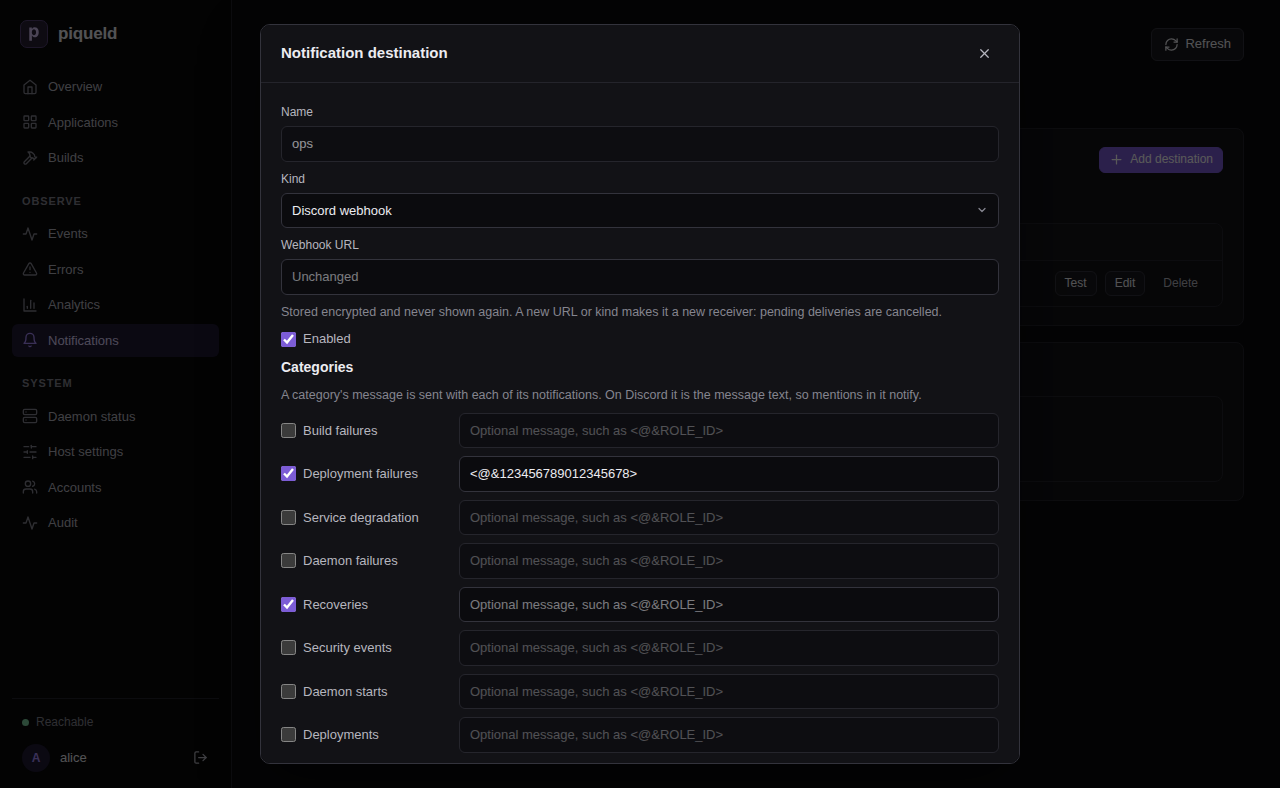
For example, to send only deployment failures and recoveries about shop, and
to mention a Discord role with each failure, select Edit on the
destination’s row in the dashboard, choose them, then select Save
destination:
Or, with piquelctl:
piquelctl notification set ops \
  --categories deployment_failures,recovery \
  --apps shop \
  --message 'deployment_failures=<@&123456789012345678>'
--categoriesreplaces the list.--message CATEGORY=TEXTsets a category’s message, and subscribes the destination to it.--no-message CATEGORYremoves only the message: the destination still receives the category. Use--categoriesto stop receiving it.--appslimits it to some applications, by name or ID.--all-appscovers every application.--previews trueadds notifications about previews.
Options you don’t give keep their current value. piquelctl notification list
shows what each destination receives, and the reference of
notification set
lists every option.
Changes apply at once and never replay the past: a category you add starts with the next event.
Change or remove a destination
- Turn it off: select Edit on its row, clear Enabled, and save.
Or run
piquelctl notification set ops --enabled false. This stops it, and cancels what it hadn’t delivered yet. Turned back on, it starts with the next event. - Change its URL or kind: change its Webhook URL or Kind in the
same form, or pass
--url-stdinor--kindtopiquelctl notification set. It then counts as a new receiver. What it hadn’t delivered is cancelled, and it won’t receive the recovery of a failure sent to the old one. - Delete it: select Delete on its row, or run
piquelctl notification delete ops. This cancels what it hadn’t delivered. Its deliveries stay in the history, under its name.
Read the delivery history
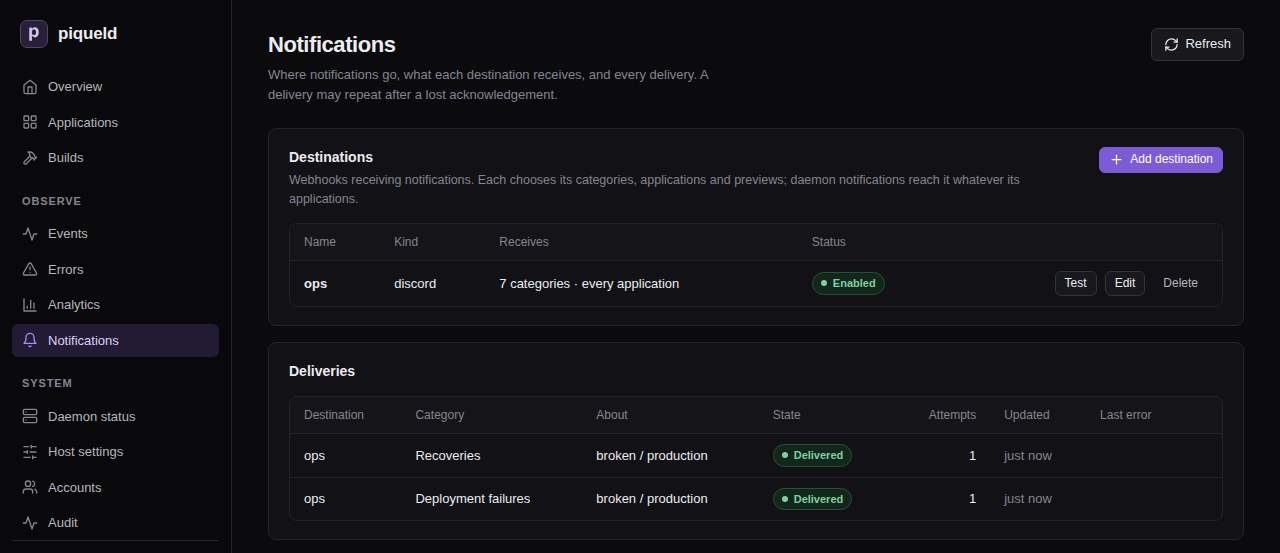
The Deliveries list on the Notifications page, or
piquelctl notification deliveries, shows each notification sent, newest
first. Test notifications aren’t part of it.
When the receiver can’t be reached, times out, or answers 408, 429 or a 5xx
status, piqueld retries with increasing delays, for up to 24 hours. Any other
non-2xx answer fails the delivery at once. To send a failed delivery again, select
Retry, or run piquelctl notification retry <delivery-id>. Both need the
system:operate permission.
When piqueld notifies
- A build or deployment failure notifies once. Later failures in the same environment and category stay silent until an operation there succeeds.
- Service and dependency problems notify only once they’ve lasted two minutes, so a quick restart doesn’t page you. Once piqueld sees them recover, a new problem notifies again.
- Each kind of internal daemon error notifies only the first time it happens, and no recovery follows.
- A recovery goes only to the destinations that were sent the failure.
- When a deployment fixes a failure, the destination receives the recovery
instead of a
deployment_succeedednotification, unless the recovery couldn’t be delivered. daemon_startedis sent as soon as the daemon accepts requests, even before Docker is ready. After an update, its message names the previous version, such aspiqueld 0.2.0 started (previously 0.1.0). A missing one doesn’t prove the start failed: check the daemon’s history.
Receive notifications in your own service
-
Add a destination pointing at your service, of kind JSON webhook in the dashboard, or with
piquelctl:piquelctl notification set hooks --kind json --url-stdin -
Handle the POST request piqueld sends for each notification. This is a deployment failure, shortened:
{ "version": 2, "instance_id": "instance-01a16b10b8307c61b5ac3d27d4bf7937", "delivery_id": "delivery-01a16b3c72347691b00a9c4fac1e1f9b", "category": "deployment_failures", "title": "Deployment failed", "subject": { "application": "broken", "environment": "production", "branch": null, "preview": false }, "message": null, "event": { "id": 53, "kind": "operation_failed", "scope": "application", "created_at_ms": 1792800485797, "message": "container image was rejected by the registry while pull image", "error_code": "image_resolution_rejected", "diagnostic": { "summary": "container image was rejected by the registry while pull image", "next_action": "Check the image reference and registry credentials, then retry the deployment.", "causes": ["Docker operation: pull image", "Docker returned HTTP status 404"] } } }subjectnames the application, the environment (or the preview’s slug, whenpreviewistrue) and the branch, as they were when the notification was queued. Each isnullwhen the notification isn’t about one.messageis the destination’s text for the category, ornull.eventis the history event behind the notification, including who caused it, asactor.- A test notification has a
nullcategory, adelivery_idstarting withtest-, and an event of kindnotification_test.
-
Answer with any 2xx status to acknowledge it.
When you write the receiver:
- A notification may arrive more than once. Every request carries an
Idempotency-Keyheader with the delivery ID: ignore a key you’ve already handled. - piqueld honours an integer
Retry-Afterheader, up to one hour. - Requests time out after 10 seconds, and redirects aren’t followed.
- Payloads aren’t signed, so keep the URL secret.
Troubleshooting
- The test fails. Test and
piquelctl notification testsay why. Check that the daemon’s host can reach the URL, and that it accepts a POST request. piqueld connects to it directly: it never follows a redirect or uses a proxy, such as one set inHTTPS_PROXY. - A notification never arrived. Look it up in the delivery history. If it
isn’t there, check the destination’s categories, applications and previews:
the dashboard’s Destinations list sums them up, and
piquelctl notification listlists them. - Retrying a delivery is refused. The refusal,
delivery_not_retryable, says why. Only a failed delivery can be sent again, while its destination still exists unchanged, is enabled, and still receives its category. A failure can’t be sent again once its problem has been resolved, and a recovery can’t once the problem has come back. - Destinations disappeared. Recovering a lost secret key deletes them, since their URLs were encrypted with it. Add them again.