Previews
A preview is a short-lived copy of an application that runs one Git branch, or your local worktree with its unpushed commits and uncommitted files. Use one to try a change before it reaches staging, then delete it.
Before you start
- This page continues with the
blogapplication of setting up staging and production. Its manifest comes from Git, and itswebroute’s hostname is${{ vars.domain }}, so each preview gets an address of its own. A preview of an application without routes runs, but has no URL. - Creating and deploying previews needs
previews:deployon the application, and deleting thempreviews:delete.apps:deployandapps:deleteinclude them; see preview permissions. - Previews’ routes are private by default, so their URLs work once the daemon serves private routes.
piquelctlis signed in. Run the commands on this page on the host, or on any machine wherepiquelctlis signed in. On another machine, keepPIQUELD_URLset, as when you signed it in.
Preview a branch
-
Give previews their own settings. Previews ignore the
[spec.environments.<name>]blocks of the manifest, and use its[spec.previews]block instead. Add it toinfra/piqueld.toml:[spec.previews] visibility = "private" [spec.previews.variables] domain = "${{ env.slug }}.preview.blog.example.com"visibilityis the strictest visibility of their routes. It isprivateby default, which keeps every preview on your tailnet.variablesoverride the defaults of[spec.variables]for every preview. Every variable the preview uses that has no default, such asdomainin the staging and production manifest, needs a value here, or the preview’s deployment fails.${{ env.slug }}is the preview’s slug, so each preview gets its own hostname.
The manifest reference describes how to name preview hostnames, so that one wildcard certificate covers them all. Previews read the manifest of their own branch, so set this in the repository’s file, not in the dashboard or with
piquelctl. -
Commit it to a branch, such as
feat/login, and push the branch to the application’s repository. Previews read the manifest from their own branch. -
Create the branch’s preview. In the dashboard, open the application’s Previews tab and select New preview. Fill in Branch with
feat/login, then select Create preview.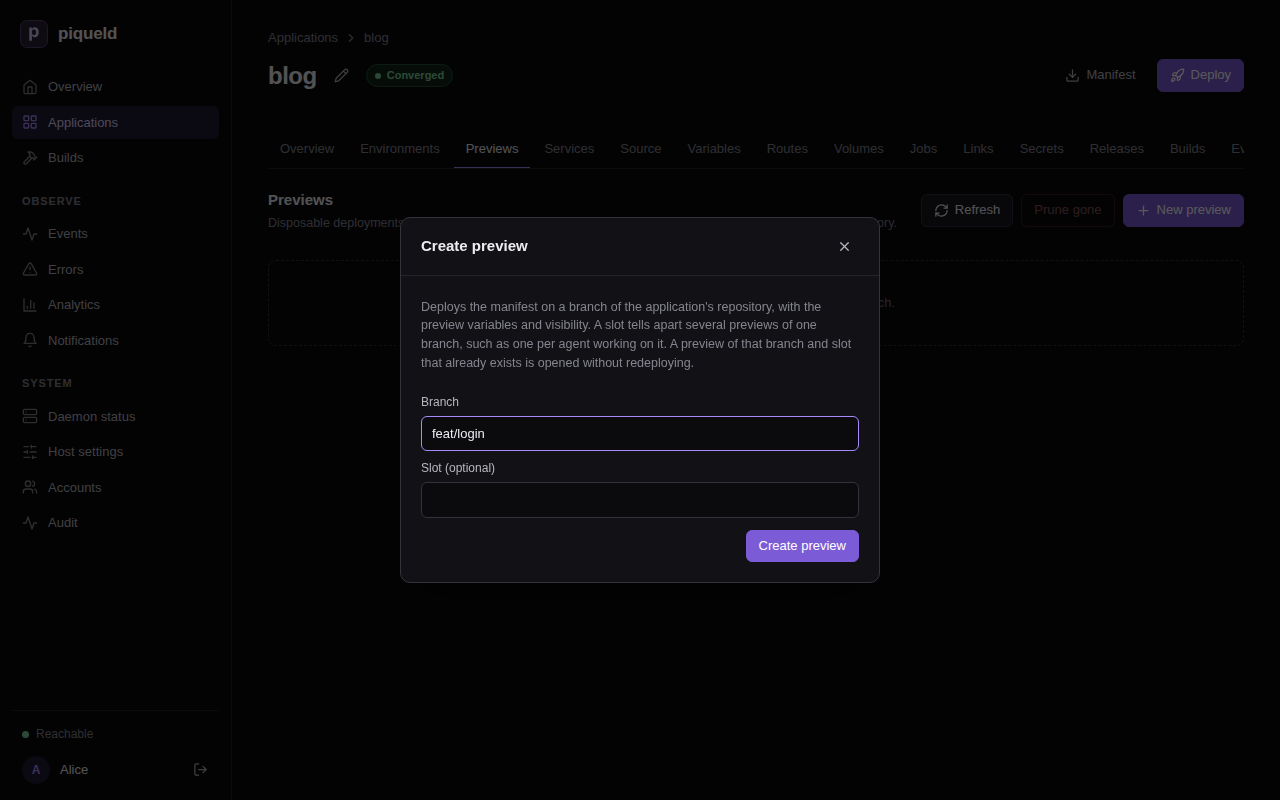
With
piquelctl:$ piquelctl --timeout 10m preview create blog --branch feat/login Preview blog-feat-login-09b526 of branch feat/login (preview-01a16d974c7f7300b014f01379224355) created Operation: operation-01a16d974c8073b1b8589cf340a6a8fd succeeded URL: https://blog-feat-login-09b526.preview.blog.example.com (web) ready
The preview deploys the manifest from feat/login, and builds the branch’s
repository = "self" services. It has its own deployments, secrets, volumes
and routes, and never shows up among the application’s environments.
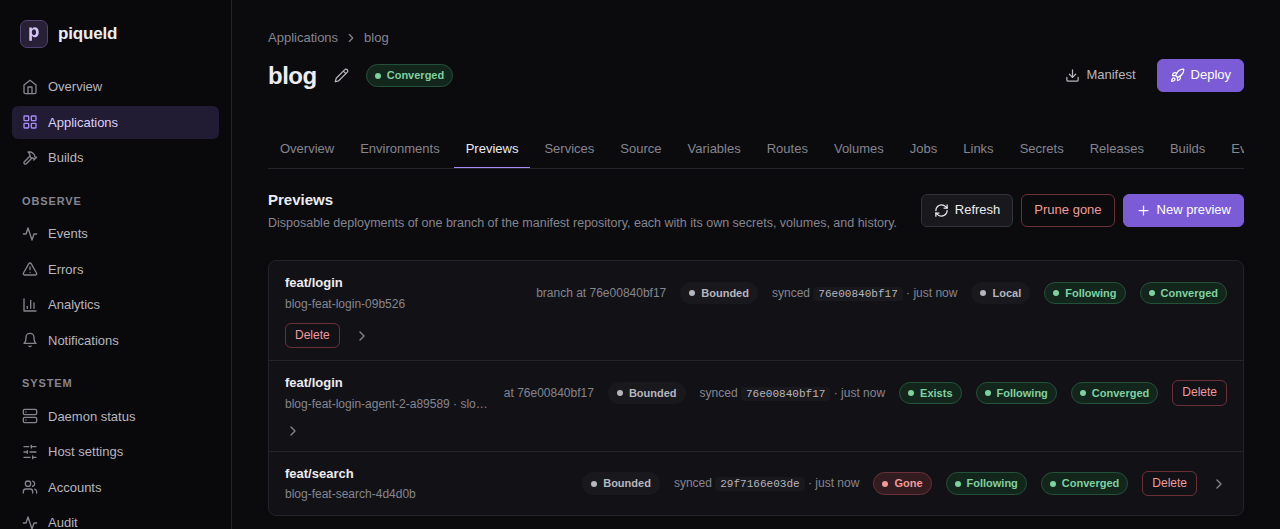
Its name, blog-feat-login-09b526, is its slug: the application and the
branch, with a short hash. Its URL is ready once its route serves requests.
Until then, it is pending, with what it waits for, such as
pending: HTTPS (Ingress is disabled in daemon configuration) on a host
without HTTP ingress.
Creating a preview of a branch that has one returns the existing preview without redeploying it. To deploy the branch’s latest commit, select Redeploy branch head, at the top of the preview’s page, or run:
piquelctl --timeout 10m preview deploy blog feat/login
While the application deploys on push, every preview also deploys each push to its branch.
Preview your local changes
In a worktree of the application’s repository, deploy what the worktree holds, without committing or pushing it:
$ cd ~/src/blog
$ piquelctl --timeout 10m preview deploy blog --local
snapshot: succeeded · 535 bytes against 3c1922b70fbd: 0 unpushed commits and the snapshot [0s]
Info: sending uncommitted files: draft.html, index.html
upload: succeeded · uploaded [0s]
…
Preview blog-feat-login-09b526 of branch feat/login (preview-01a16d974c7f7300b014f01379224355) exists
Deploys: local snapshot 88a48a99160c on 3c1922b70fbd
Operation: operation-01a16d97ef6f7d428a26bb376408270c succeeded
URL: https://blog-feat-login-09b526.preview.blog.example.com (web) ready
It deploys to the preview of the current branch, and creates it if needed.
With a detached HEAD, name the branch with --branch. It sends the
worktree’s committed, uncommitted and untracked files, but not the files Git
ignores. A tracked file that Git ignores is sent as committed, without your
edits. Your branch, index and files don’t change.
Only what the repository lacks is uploaded: the commits you haven’t pushed, and your changes. piqueld fetches the rest from the application’s repository. Run the command again after each change, to deploy a new snapshot to the same preview.
The preview’s page shows the snapshot it runs, and the commit it was taken on:
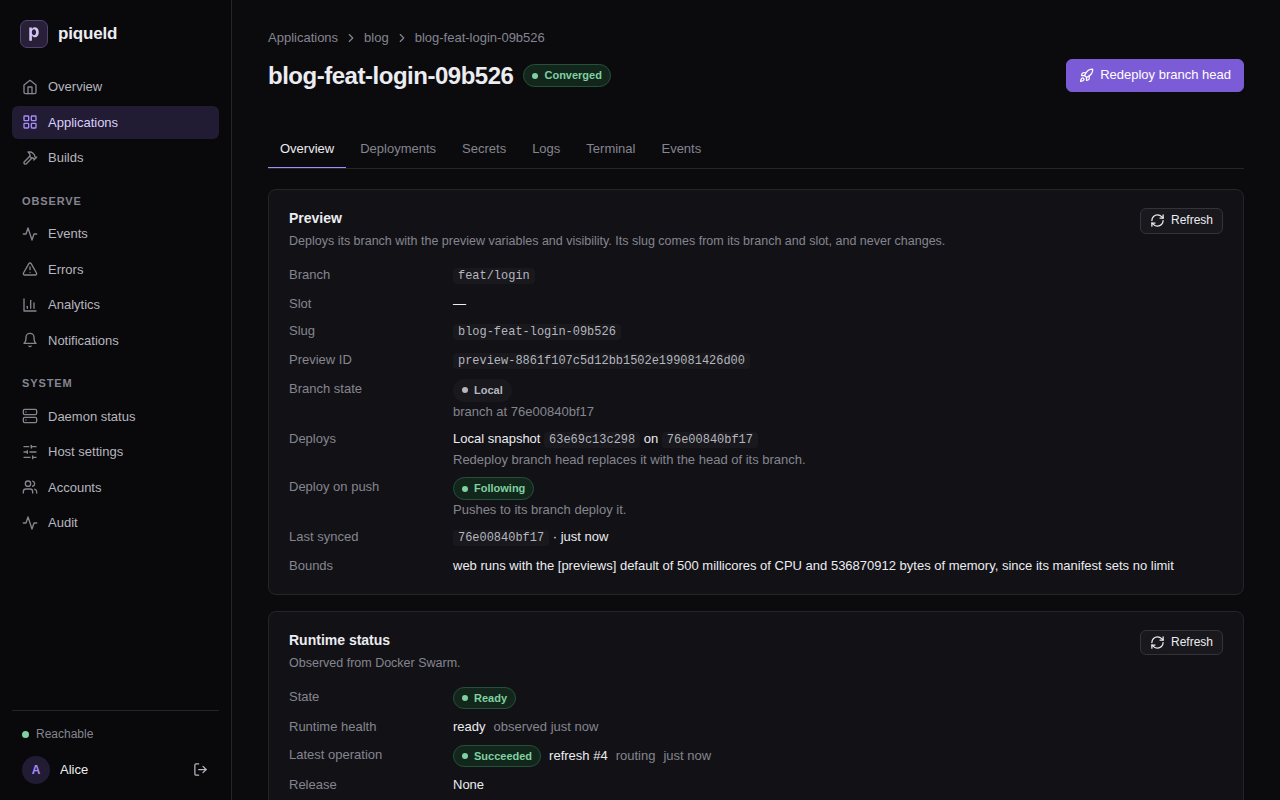
To deploy the pushed branch again, select Redeploy branch head, or run
piquelctl preview deploy blog feat/login. Either needs the branch pushed. A push to the branch also replaces the
snapshot, while the application deploys on push.
Run several previews of one branch
A slot tells several previews of the same branch apart, such as one per
person or agent. In the dashboard, fill in Slot (optional) in New
preview. With piquelctl, pass --slot:
$ piquelctl --timeout 10m preview create blog --branch feat/login --slot agent-2
Preview blog-feat-login-agent-2-a89589 of branch feat/login (slot agent-2) (preview-01a16d98b0aa74f38af94b59963c8fb6) created
Operation: operation-01a16d98b0ac7d409995feeac2fbd5ee succeeded
URL: https://blog-feat-login-agent-2-a89589.preview.blog.example.com (web) ready
Address it with its slug, or with its branch and --slot, such as
piquelctl preview deploy blog feat/login --slot agent-2. preview deploy --local takes --slot too.
Find a preview’s address and logs
In the dashboard, select the preview on the Previews tab: its
Overview lists its URLs, and its Logs tab its services’ output. With
piquelctl:
piquelctl preview url blog feat/login
piquelctl preview logs blog feat/login
piquelctl preview show blog feat/login
preview show also says what the preview deploys and how its branch moved.
Give previews stored secrets
Each preview generates its own values for the secrets the manifest
generates. A secret you stored with piquelctl app secret is only given to
previews when its access allows them. Someone with secrets:write on the
application allows them: in the dashboard, select Edit on the secret’s
row of the application’s Secrets tab, check Previews, and select
Save access only. With piquelctl:
piquelctl app secret blog access stripe-test --previews
Check that it works
The application’s Previews tab lists its previews, with their branch
state. With piquelctl:
$ piquelctl preview list blog
BRANCH  SLOT  SLUG  STATE  BRANCH STATE  SYNC  SYNCED  LAST OPERATION  ID
feat/login  -  blog-feat-login-09b526  ready  local  following  3c1922b70fbd  succeeded operation-01a16d97ef6f7d428a26bb376408270c  preview-01a16d974c7f7300b014f01379224355
feat/login  agent-2  blog-feat-login-agent-2-a89589  ready  exists  following  3c1922b70fbd  succeeded operation-01a16d98b0ac7d409995feeac2fbd5ee  preview-01a16d98b0aa74f38af94b59963c8fb6
For a preview of a branch, the branch state compares the branch in the
repository with the commit the preview last fetched; local and unknown
replace that comparison. It doesn’t say whether that deployment succeeded: the
LAST OPERATION column does.
| State | Meaning |
|---|---|
exists | The branch is at the commit the preview last fetched. |
moved | The branch is at another commit, such as a new push or a force-push. |
gone | The branch was deleted. |
local | The preview runs, or is deploying, a snapshot of a local worktree. |
unknown | piqueld couldn’t read the repository. |
Delete a preview
Deleting a preview removes its services, secrets, deployment history and
volumes. Its volumes’ data is deleted with them. In the dashboard, select
Delete on its row of the Previews tab. With piquelctl:
$ piquelctl preview delete blog feat/login --slot agent-2
Preview preview-01a16d98b0aa74f38af94b59963c8fb6 deleted (its volumes removed)
The command asks you to confirm first; in a script, add --yes.
piqueld never deletes a preview on its own, even once its branch is gone.
When you delete a branch, such as feat/search once you merged it, its
preview’s branch state becomes gone. To delete every preview whose branch
was deleted from the repository, select Prune gone on the Previews
tab, or run:
$ piquelctl preview prune blog --branch-gone
Deleting preview blog-feat-search-4d4d0b of branch feat/search (preview-01a16d99010e7ce2a2363009ebb73083) with its volumes: operation operation-01a16d9b9a5c75c1bc9d4e7467826716
It asks you to confirm first too. It keeps the previews whose branch state is
local or unknown. When piqueld can’t read the repository, it deletes
nothing and fails with repository_unavailable.
Deleting the application deletes its previews, with their volumes.
Limits
Previews share the host with production, so the daemon’s
[previews] settings
limit them:
max_per_applicationandmax_totalcap how many previews there are.max_replicascaps the replicas of each preview service.default_cpu_millisanddefault_memory_bytesare the CPU and memory limits of the preview services whose manifest sets none. A limit the manifest sets is kept, even above these defaults.
A service capped or given a default runs anyway. piquelctl preview show
reports it, such as Bounded: web runs with the [previews] default of 500 millicores of CPU and 536870912 bytes of memory, since its manifest sets no limit, and the dashboard marks the preview Bounded.
Troubleshooting
- Creating fails with
preview_requires_repository. The application doesn’t read its manifest from Git. Connect a repository first; see deploying on push. - Creating fails with
preview_limit_reached. The application, or the host, has as many previews as[previews]allows. The error lists them: delete one you no longer need. --localsays no remote-tracking branch has an ancestor ofHEAD. None of your worktree’s commits was pushed, so piqueld would need the whole history. Push the branch, or pass--full-historyto upload all of it. The daemon still needs to read the application’s repository.--localsays the daemon could not fetch a commit from the application’s repository, or fails withsnapshot_base_unavailable. The daemon can’t fetch the commit your snapshot builds on. Push it, or pass--full-history.--localsays the snapshot is more than the daemon’s upload limit, or that its files take more than the daemon checks out, or fails withsnapshot_too_large. The upload or the worktree is larger than the daemon accepts:snapshots.max_upload_bytesandcheckouts.max_bytes. When the files are too large, the command names the largest ones.--localrefuses the worktree. Git submodules, nested repositories, Git LFS and other filters, partial clones and SHA-256 repositories aren’t supported.- The deployment fails with
manifest_invalid. The manifest on the preview’s branch doesn’t validate for previews, such as when a variable without a default has no value in[spec.previews.variables]. The daemon’s log (journalctl -u piqueld) names each error. - The deployment fails with
secret_access_denied. The preview mounts a stored secret whose access doesn’t include previews. Allow them, as in giving previews stored secrets, or mount another secret in previews. - The deployment fails with
hostname_conflict. The preview renders the same hostname as an environment or another preview. Build preview hostnames from${{ env.slug }}.