Environments and promotion
An application can run several environments, such as staging and
production. Each has its own deployments, secrets, volumes and routes. This
page adds environments, gives each its own settings, and promotes what staging
runs to production without building it again.
Before you start
- You have an application, such as
hellofrom deploying your first application. If you deleted it at the end of that page, create it again. piquelctlis signed in. Run the commands on this page on the host, or on any machine wherepiquelctlis signed in. On another machine, keepPIQUELD_URLset, as when you signed it in.- For an environment to follow its own branch, or to deploy on push, the application reads its manifest from Git. See deploying on push.
- Adding environments needs
apps:writeon the application, deploying, promoting, stopping or starting themapps:deploy, and deleting themapps:delete. Creating the application in Set up staging and production needsapps:create; see permissions. - In that section, staging is private: it needs piqueld to serve private routes, and you test it from a device on your tailnet.
Add an environment
To add a staging environment to hello in the dashboard, open the
application’s Environments tab and select New environment. Fill in
Environment name, then select Create environment. The environment’s
page opens: select Deploy to deploy it. On the Environments tab, each
environment’s row also has its own Deploy button, and selecting the row
opens its page.
With piquelctl:
$ piquelctl env create hello staging
Environment staging (env-01a16d902a9e7fa2a37914ff1fd0a3d6), deploys from the saved manifest.
$ piquelctl --timeout 5m env deploy hello staging
In the manifest, declare it.
Both environments now run the application’s manifest:
$ piquelctl env list hello
NAME  STATE  SOURCE  RESOLVED  ID
production  ready  saved  2  env-01a16d8f99567681ada904f809903067
staging  ready  saved  2  env-01a16d902a9e7fa2a37914ff1fd0a3d6
env commands take the application, then the environment. Commands that act
on an application’s only environment, such as piquelctl app deploy hello,
now fail and list the environments to choose from.
When the application reads its manifest from Git, each environment follows
its own branch. In the dashboard, New environment then also asks for its
Branch. env create takes --branch, by default the branch the
connection names, and with it --commit pins one commit. env branch
changes the branch later, as does Branch on the Source card of the
environment’s Overview. The environment’s next deployment reads the new
branch:
piquelctl env create blog qa --branch develop
piquelctl env branch blog qa release
Declare environments in the manifest
A manifest can list the application’s environments, each in its own block:
[spec.environments.staging]

[spec.environments.production]
The manifest then decides which environments exist. Saving it, or deploying
it from the repository, creates the environments it declares that don’t
exist yet, without deploying them. piquelctl app plan lists them before you
save a manifest file.
A declared environment can’t be created, renamed or deleted with piquelctl env or the dashboard: change the manifest instead. Removing a block doesn’t
delete its environment, since it holds volumes and secrets. It keeps running,
and piquelctl app show lists it as no longer declared until you delete it
with piquelctl env delete.
A block also sets where its environment deploys from:
| Setting | Effect |
|---|---|
branch, commit | The branch it follows, or the commit it deploys |
sync | Whether pushes to its branch deploy it |
promote_from | The environment it receives releases from, instead of building |
visibility | private keeps all its routes on your tailnet |
variables | Its own values |
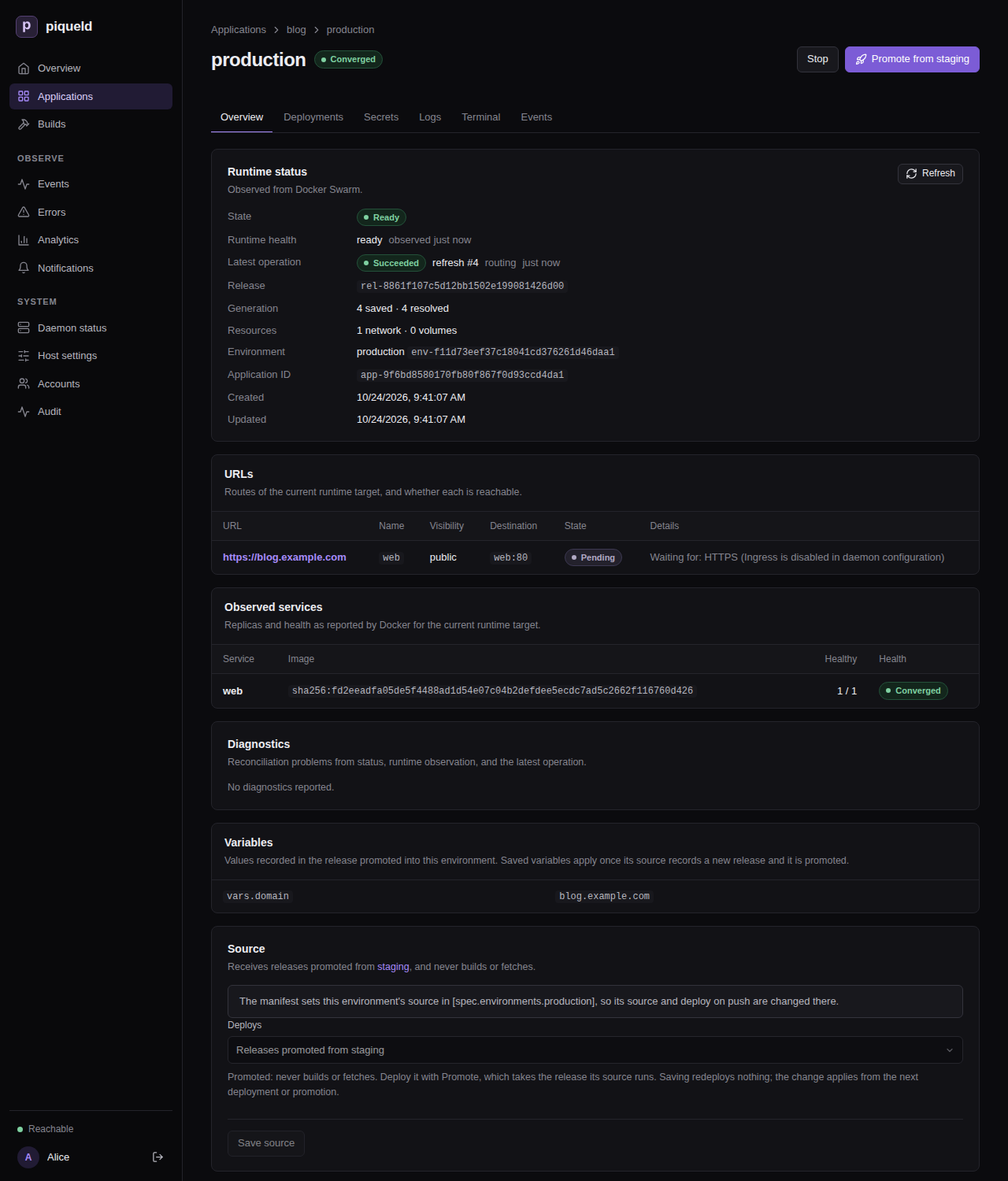
Manifest settings describes each one. When a block sets where its environment deploys from, the environment’s Source card in the dashboard says so, and can’t change it:
Give each environment its own values
Values that differ between environments, such as a hostname or a number of
replicas, come from variables. Declare a default, override it for an
environment, and use it as ${{ vars.<name> }}. Here, production runs three
replicas of web, and staging one.
In the dashboard
- On the application’s Variables tab, which has a row per variable and
a column per environment, select Add variable. Fill in Name with
web_replicas, Default with1, and the production column with3, then select Save changes. - On
web’s Source & scaling tab, set Replicas to${{ vars.web_replicas }}, and select Save changes. - Deploy each environment, from its row on the Environments tab.
With piquelctl
piquelctl app variable set hello web_replicas 1
piquelctl app variable set hello web_replicas 3 --env production
piquelctl app service replicas hello web '${{ vars.web_replicas }}'
piquelctl --timeout 5m env deploy hello staging
piquelctl --timeout 5m env deploy hello production
In the dashboard or with piquelctl, when the manifest doesn’t declare
environments yet, setting a value for one environment adds a block for every
existing environment, which
declares them all. From then on,
deleting or renaming them fails with environment_declared.
From the manifest
-
Add these blocks to the end of
hello.toml:[spec.variables] web_replicas = 1 [spec.environments.staging] [spec.environments.production.variables] web_replicas = 3A
[spec.environments.<name>]block, even an empty one, declares its environment, so the manifest lists both. An environment may also set a variable that has no default, such as its hostname. -
Make
webuse the variable, in its existing[[spec.services]]entry:[[spec.services]] name = "web" -replicas = 2 +replicas = "${{ vars.web_replicas }}"Production runs three replicas, and staging one.
-
Check what production would run:
$ piquelctl app plan --file hello.toml --env production
Application: app-01a16d8f99567681ada904f809903066

Changes:
  ~ services.web.replicas   2 → 3

Actions: 1 total · 0 runtime mutations · 0 destructive · 0 blocking
  Network, volume, and service changes are not listed yet: the deployment plans them once it has resolved the sources. Source resolution and declared jobs are listed.
   1. Resolve image web
      no risk · resolution required

Variables:
  app.name = hello
  deployment.id = preview
  env.name = production
  env.slug = production
  vars.web_replicas = 3

Rollout:
  web: start-first (derived) · monitor 30s
The plan shows the values production renders. Its actions stop at resolving the image: the deployment plans the scaling once it knows the image. piqueld sets system variables, such as
env.nameandapp.name, itself. The manifest reference lists them, and the settings that accept variables. -
Save the manifest:
piquelctl app apply --file hello.toml -
Deploy each environment:
piquelctl --timeout 5m env deploy hello staging
piquelctl --timeout 5m env deploy hello production
Keep an environment on your tailnet
To keep an environment’s routes on your tailnet, whatever each route says, set its visibility to private:
- In the dashboard, set Route visibility to Private: every route is tailnet-only on the Visibility card of the environment’s Overview, and select Save visibility.
- With
piquelctl, runpiquelctl env visibility hello staging private. - In the manifest, set
visibility = "private"in the environment’s[spec.environments.<name>]block.
Deploy the environment to apply it. A promoted environment gets its
visibility from the release it receives instead: promote a release that
staging deployed after the change. When the manifest doesn’t declare
environments yet, setting a visibility in the dashboard or with piquelctl
declares them all, as setting a variable’s value for one environment does.
Promote releases
Once a deployment of an environment has built or pulled its images, piqueld records a release: the manifest it deployed and its exact images. A promoted environment never builds. It receives the release another environment runs, so production runs exactly the images you tested on staging. When its rollout fails, it rolls back to its last successful deployment unless you choose otherwise.
Set up staging and production
This section creates a new application, blog, that builds on staging from
every push to main, and promotes to production.
If you created blog while following deploying on push,
delete it first. This removes its containers and history:
piquelctl app delete blog
-
Commit the manifest to the application’s repository as
infra/piqueld.toml, and push it tomain:api_version = "piqueld.dev/v1alpha1" kind = "Application" [metadata] name = "blog" [spec.environments.staging] sync = true visibility = "private" [spec.environments.staging.variables] domain = "staging.blog.example.com" [spec.environments.production] promote_from = "staging" [spec.environments.production.variables] domain = "blog.example.com" [[spec.services]] name = "web" [spec.services.source] type = "git" repository = "self" [spec.services.source.build] type = "docker" dockerfile = "Dockerfile" # A runtime setting, not a build argument, so staging's image suits production. [spec.services.environment] ORIGIN = "https://${{ vars.domain }}" [spec.services.healthcheck] type = "http" port = 80 path = "/" [[spec.routes]] name = "web" hostname = "${{ vars.domain }}" service = "web" port = 80 visibility = "public"stagingfollowsmainand deploys every push to it.productiononly receives releases promoted fromstaging.- Each environment serves its own hostname, through the
domainvariable. Staging’s route stays on your tailnet.
-
Create
blogand connect it to the repository, as in deploying on push, and turn on deploying on push, polling every 120 seconds: set Deploy on push on the Source tab, or add--sync poll --interval 120topiquelctl app repository connect. Don’t deploy it yet: its only environment, production, will be promoted. -
Add the
stagingenvironment, and deploy it. In the dashboard, select New environment on the Environments tab, fill in Environment name withstagingand Branch withmain, and select Create environment, then Deploy on staging’s page. Withpiquelctl:piquelctl env create blog staging piquelctl --timeout 10m env deploy blog staging
Staging’s deployment reads the manifest, which declares both environments. Production now receives releases promoted from staging, and waits for its first promotion:
$ piquelctl env list blog
NAME  STATE  SOURCE  RESOLVED  ID
production  not_deployed  promoted from staging  none  env-01a16d95dab27100a7df0f7acf4d907c
staging  ready  main  1  env-01a16d95dac072e2beee6b3df0553b0c
Promote staging to production
Test staging first, from a device on your tailnet. Then promote it.
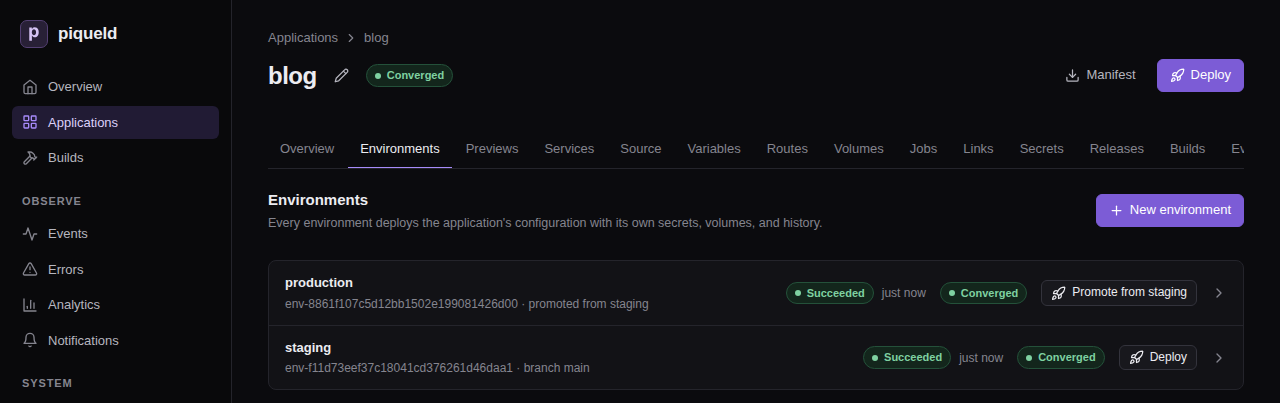
In the dashboard, production’s row on the Environments tab, and its page, offer Promote from staging. Staging’s page offers Promote, which lists the environments promoted from staging: select production’s Promote from staging there. Each shows the plan first, then Promote release deploys it.
With piquelctl:
-
See what promoting would change:
piquelctl env promote blog production --planThe plan lists how production would change, the release and where it comes from, and the values it renders there.
…marks the lines left out here:Application: app-01a16d95dab27100a7df0f7acf4d907b Changes: + manifest path: infra/piqueld.toml, repository: branch: main, url: https://github.com/example/blog.git, sync: interval seconds: 120, mode: poll + routes.blog.example.com name: web, port: 80, service: web, visibility: public … Actions: 3 total · 2 runtime mutations · 0 destructive · 0 blocking … Release: rel-01a16d95e1627d5191c37f6cf0e8a041 commit 16139dfe6e37dc5f6a12c04c24629136d4c4e289 created 1792839901532 Images: all present web: sha256:c0dcd0655ca8b48797f2ba02f1e323d17d12b04b18bf7a9f82c27849475d4fc4 (built from https://github.com/example/blog.git (16139dfe6e37dc5f6a12c04c24629136d4c4e289) at 16139dfe6e37dc5f6a12c04c24629136d4c4e289) Origin: promoted from staging's deployment operation-01a16d95dac676919a2e9efe0dc3299b Variables: … env.name = production … vars.domain = blog.example.com … -
Promote it:
$ piquelctl --timeout 5m env promote blog production
Promoting release rel-01a16d95e1627d5191c37f6cf0e8a041 into environment production: promoted from staging's deployment operation-01a16d95dac676919a2e9efe0dc3299b, deployment operation-01a16d964c787761b0128e7898e78122.
Operation: operation-01a16d964c787761b0128e7898e78122
  State: succeeded
  Environment: env-01a16d95dab27100a7df0f7acf4d907c
  Phase: routing
After you confirm, production deploys the release staging runs, rendered with production’s variables, and the command waits until it’s done.
Promotion never happens on its own: pushes to main only redeploy staging.
Promote again whenever staging runs something you want in production.
Only staging’s current deployment can be promoted, once it succeeded and runs
healthy. To promote exactly the deployment you tested, pass its ID with
--deployment. If staging deploys again in the meantime, the promotion then
fails rather than promoting the newer deployment.
Deploy an earlier release
The application’s Releases tab lists its releases, newest first, with the
environments they were promoted to. So does piquelctl app releases blog:
rel-01a16d95e1627d5191c37f6cf0e8a041  commit 16139dfe6e37dc5f6a12c04c24629136d4c4e289  created 1792839901532
  Images: all present
  web: sha256:c0dcd0655ca8b48797f2ba02f1e323d17d12b04b18bf7a9f82c27849475d4fc4 (built from https://github.com/example/blog.git (16139dfe6e37dc5f6a12c04c24629136d4c4e289) at 16139dfe6e37dc5f6a12c04c24629136d4c4e289)
  Deployed to: production as operation-01a16d964c787761b0128e7898e78122, promoted from staging's deployment operation-01a16d95dac676919a2e9efe0dc3299b
To go back to an earlier one, expand the release on the Releases tab, and
select Deploy to production. Review the plan, then select Deploy
release. With piquelctl, deploy it to the promoted
environment by ID:
piquelctl --timeout 5m env promote blog production --release <release-id>
Images from a registry are pulled again. Images piqueld built can only be
deployed while it keeps them: what each environment runs, and its last three
successful deployments.
images.keep_deployments,
in the daemon’s configuration, changes that number.
To return any environment to a deployment exactly as it ran, with the variables and secrets it had, restore it instead.
Keep builds the same in every environment
A release’s images are built once, on staging. So every setting that goes
into a build must be the same in production: the image, the Dockerfile and
context, the build arguments and the target. A build argument that uses a
variable, such as GREETING = "Hello from ${{ vars.domain }}", stops the
promotion:
web.source.build.args.GREETING: renders differently in this environment than in the release, whose images were built from it (release_incompatible)
Pass such values to the running service instead, in environment, as
ORIGIN is above.
Promote without declaring environments
An environment the manifest doesn’t declare can be made promoted in the
dashboard or with piquelctl. Neither deploys anything.
In the dashboard, choose the source in Promote from when you create the environment. For an existing one, open its Overview, set Deploys on its Source card to Releases promoted from staging, and select Save source. Builds its own source makes it build again.
With piquelctl, create a promoted environment, convert an existing one, or
make it build its own source again:
piquelctl env create blog production --promote-from staging
piquelctl env source blog production --promote-from staging
piquelctl env source blog production --tracking
Check that it works
The application’s Environments tab lists each environment with its state
and source. With piquelctl:
$ piquelctl env list blog
NAME  STATE  SOURCE  RESOLVED  ID
production  ready  promoted from staging  1  env-01a16d95dab27100a7df0f7acf4d907c
staging  ready  main  1  env-01a16d95dac072e2beee6b3df0553b0c
piquelctl env show blog production also prints the release the
environment runs, its variables and its URLs.
Stop an environment
Stop an environment you don’t need for a while, such as staging between tests. Its routes stop being served and its services stop, but it keeps its configuration, volumes and secrets, and its hostnames stay reserved for it.
In the dashboard, select Stop on the environment’s page, and confirm. Its
health then shows Stopped, on its page and in the Environments tab.
Start, in the same place, runs it again. With piquelctl:
piquelctl env stop hello staging
piquelctl env start hello staging
env stop waits until the services have stopped, and env start until they
run again. For an application with a single environment, piquelctl app stop hello and piquelctl app start hello do the same.
A stopped environment stays stopped until you start it, deploy it, promote
into it, reconcile it, as piquelctl env reconcile does, or
restore one of its deployments that succeeded: each of those
starts it again.
Pushes don’t deploy it meanwhile. Starting or reconciling it deploys the
latest commit of its branch that it missed, if it
deploys on push. Previews can’t be
stopped: delete them instead.
Delete an environment
Deleting an environment removes its services, secrets and deployment history. Its named volumes are kept, with their data. If the manifest declares the environment, remove its block and save the manifest first.
In the dashboard, select Delete environment, at the bottom of the
environment’s Overview. With piquelctl:
piquelctl env delete hello staging
Troubleshooting
- A command says
environment required. The application has several environments. Use theenvcommand and name one, such aspiquelctl env deploy hello staging. - It fails with
environment_declared. The manifest declares that environment, so it decides whether it exists and where it deploys from. Change its[spec.environments.<name>]block instead. - It fails with
environment_unknown. No environment has that name, and editing withpiquelctlor the dashboard never creates one. Check the name, or declare the environment and apply the manifest. - Planning or deploying fails with
variable_value_missing. The environment has no value for a variable the manifest uses. Set one for it, or a default. - Deploying fails with
environment_promoted. A promoted environment never builds: promote it withpiquelctl env promote. - Promoting fails with
promotion_source_not_ready. The source’s current deployment failed, or one of its services isn’t healthy right now. Fix the source first. - Promoting fails with
promotion_source_changed. The source deployed again since you reviewed it. Plan the promotion again. - Promoting fails with
release_incompatible. A build setting renders differently in the target environment. See keeping builds the same. - Promoting fails with
image_unavailable. piqueld removed the release’s images. Promote a newer release. - Promoting fails with
secrets_unavailable. The release mounts secrets the target environment doesn’t have or may not use. The error lists each one. - Deleting fails with
promotion_source_in_use. Other environments promote from it. Point them at another source first. - Deploying fails with
hostname_conflict. Two environments render the same route hostname. Give each its own value, through a variable.