Secrets and variables
Give your services passwords and API keys without writing them in the manifest, and set values in one place with variables, such as how many replicas a service runs.
Before you start
- You have an application, such as the one from
Configuring services. The examples use
notes, with a PostgreSQL servicedband an nginx serviceweb, and its one environment,production. - Run the commands on this page on the host, or on any machine where
piquelctlis signed in. - Setting, regenerating and deleting secret values, and choosing who may mount
them, needs the
secrets:writepermission on the application. Editing the manifest needsapps:write, deploying itapps:deploy, and running a command in a containerapps:exec.
How secrets reach your services
piqueld puts each secret in a read-only file under /run/secrets in the
container. It never writes a secret value in the manifest or in an environment
variable, so point your service at the file. Many images read a variable
ending in _FILE for this, such as PostgreSQL’s POSTGRES_PASSWORD_FILE.
A secret’s value comes from one of two places:
- Generated: you declare the secret in the manifest, and piqueld generates a value for each environment. Use it for values nobody needs to type, such as a database password.
- Stored: you set the value yourself, in the application’s secret store. Use it for values that come from elsewhere, such as an API key.
Generate a secret
Declare the secret, then mount it in a service, as a file under
/run/secrets/. notes, from Configuring services, already
generates the database’s password, db-password, and mounts it in db.
To declare another one, such as session-key:
-
In the dashboard, open the application’s Secrets tab. On the Generated secrets card, select Add generated secret, fill in Secret name, choose what it Generates, and select Save changes.
-
With
piquelctl:piquelctl app generated-secret set notes session-key --bytes 32--rsa-bits 3072makes an RSA key instead.app generated-secret list noteslists the declarations, andapp generated-secret removeremoves one. -
In the manifest, add a
[[spec.secrets]]table.
Then mount it as a stored secret is mounted, on the
service’s secret files card, with piquelctl app service secret add, or
with a [[spec.services.secrets]] table. These are the lines of notes.toml
that generate and mount db-password:
[[spec.services]]
name = "db"
# ...

[spec.services.environment]
POSTGRES_PASSWORD_FILE = "/run/secrets/db-password"
# ...

[[spec.services.secrets]]
name = "db-password"
target = "/run/secrets/db-password"

# ...

[[spec.secrets]]
name = "db-password"
generate = { type = "random", bytes = 32 }
[[spec.secrets]]declares the secretdb-password, and how to generate it.[[spec.services.secrets]]mounts it indb, as the file/run/secrets/db-password.POSTGRES_PASSWORD_FILEtells PostgreSQL to read its password from that file.
Deploy once the secret is mounted.
The first deployment that mounts db-password generates its value: 32 random
bytes, written as 64 hexadecimal characters. Each environment gets its own
value and keeps it: later deployments and changes to the declaration never
replace it.
generate can also write the bytes as base64url, with
encoding = "base64url" or --encoding base64url, or make an RSA private
key, with { type = "rsa", bits = 3072 }.
Manifest settings
lists every option.
Store a secret
Store the value in the application’s secret store, then mount it in a
service, as a file under /run/secrets/. Jobs mount secrets the
same way. Here, web gets an SMTP password, smtp-password, and reads its
path from SMTP_PASSWORD_FILE. Deploy once it’s mounted.
In the dashboard
-
Open the application’s Secrets tab. Under Save a secret, enter the Secret name and the Value, then select Save secret. The value can’t be read back, and the dashboard only stores text: store binary files with
piquelctl.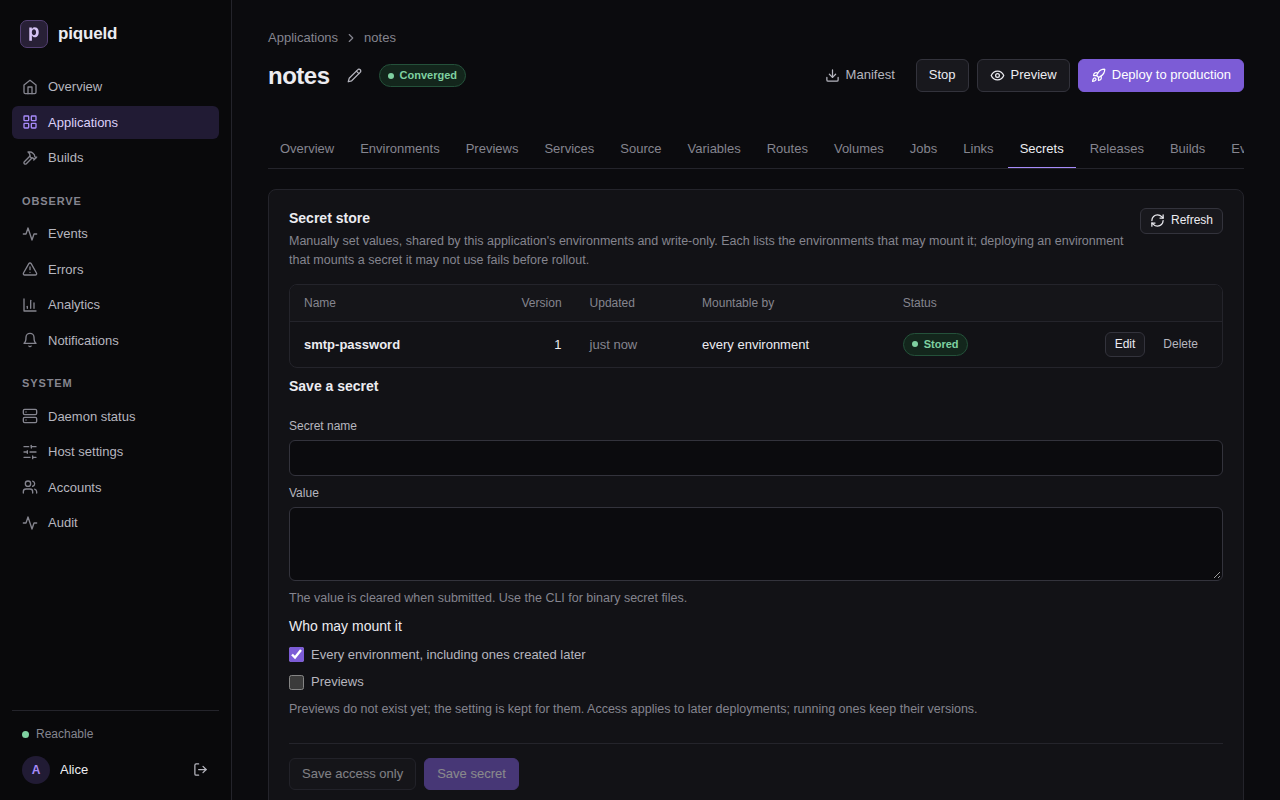
-
Below the store, each service has a secret files card. On
web’s, select Add secret file, enter the Secret name and the Container path,/run/secrets/smtp-password, then select Save changes. -
On
web’s Environment tab, setSMTP_PASSWORD_FILEto/run/secrets/smtp-password.
With piquelctl
Put the value in a file, then store it:
piquelctl app secret notes set smtp-password --file ./smtp-password
After you confirm, it prints:
Saved smtp-password generation 1, mountable by every environment. Deploy to use it.
piqueld stores the file byte for byte, including the newline at the end
that most editors add. Write the file with printf '%s' to leave it out.
To pipe the value in instead, use --stdin, which drops one trailing
newline, with --yes, since piquelctl can’t ask you to confirm while it
reads the value:
echo "$SMTP_PASSWORD" | piquelctl app secret notes set smtp-password --stdin --yes
Run in a terminal without a pipe, --stdin asks for the value instead, and
doesn’t show what you type.
Values are 1 to 512,000 bytes long. Avoid typing them in a command, where your shell history keeps them.
Then mount it in web, and point web at the file:
piquelctl app service secret add notes web smtp-password /run/secrets/smtp-password
piquelctl app service env set notes web SMTP_PASSWORD_FILE /run/secrets/smtp-password
app service secret list notes web lists the service’s mounts, and
app service secret remove notes web /run/secrets/smtp-password removes one.
In the manifest
Mount it like a generated secret. A name that spec.secrets doesn’t declare
comes from the store. Add to the existing web entry:
 [[spec.services]]
 name = "web"
 replicas = 2
 depends_on = ["db"]
+
+[spec.services.environment]
+SMTP_PASSWORD_FILE = "/run/secrets/smtp-password"
+
+[[spec.services.secrets]]
+name = "smtp-password"
+target = "/run/secrets/smtp-password"

 [spec.services.source]
Choose who may mount a stored secret
By default, every environment may mount a stored secret, including
environments created later, but previews may not. To allow only production in
the dashboard, select Edit next to the secret. Under Who may mount
it, uncheck Every environment, including ones created later, check only
production, and select Save access only. With piquelctl:
$ piquelctl app secret notes access smtp-password --environments production
Saved smtp-password generation 1, mountable by production. Deploy to use it.
--environments takes a comma-separated list of environment names, and
--all-environments allows every environment again. --previews lets
previews mount the secret too, and --no-previews stops them. set takes the
same options, to choose when you store a secret.
piquelctl app secret notes list shows who may mount each secret.
Changing who may mount a secret doesn’t change running services. Deploying an environment that mounts a secret it may not use fails at once, before changing anything.
Check that it works
In the dashboard, open the environment, then its Secrets tab: Mounted secrets lists each secret the environment’s manifest mounts, and where its next deployment takes the value from. Generated secrets lists the values piqueld generated for it.
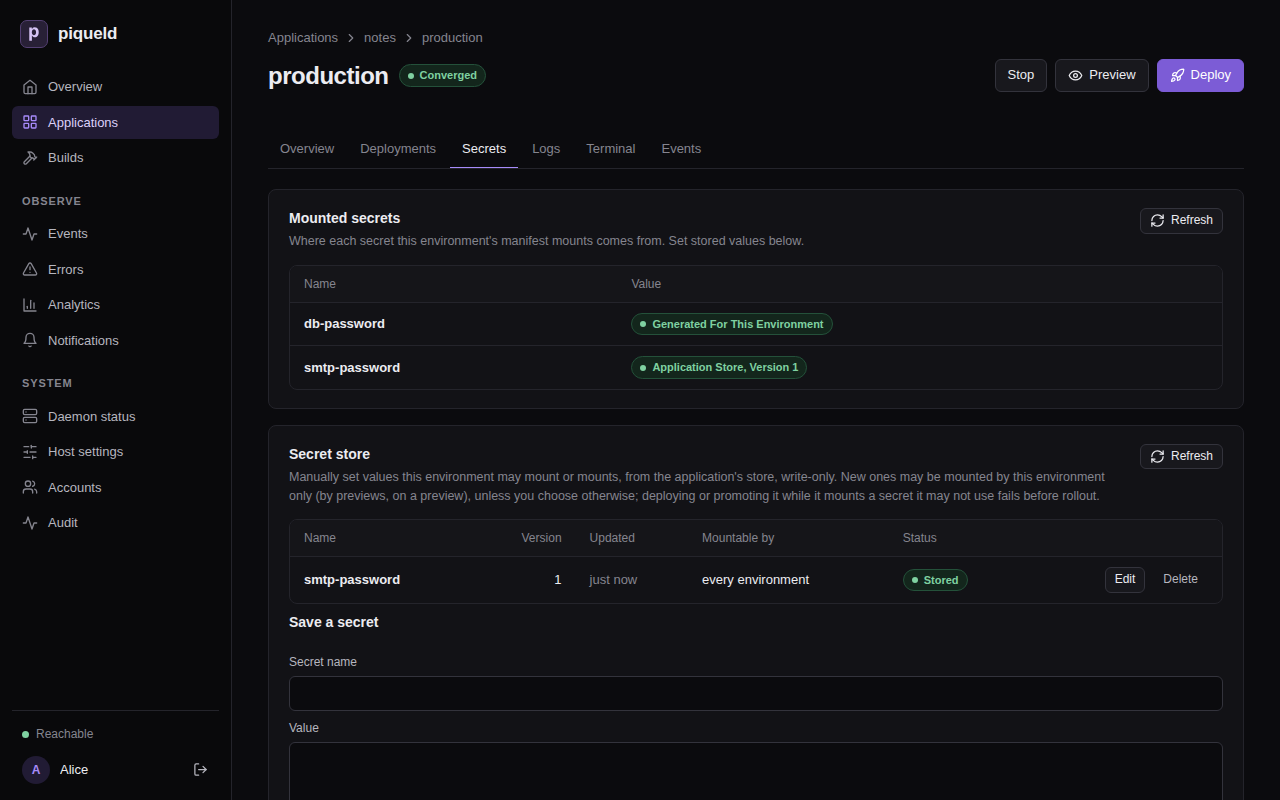
piquelctl env show lists the same:
$ piquelctl env show notes
production of notes (env-01a16d95420677219cf7b65149b4f7e8)

Intent: ready
Runtime: ready (observed 0 s ago)
...
Secret: db-password: generated for this environment
Secret: smtp-password: application store, version 1
To see the files themselves, run a command in the container:
$ piquelctl app exec notes db -- ls -l /run/secrets
total 4
-r--r--r--    1 root     root            64 Oct 24 11:08 db-password
Use variables
Manifest variables hold values you set in one place, and that each environment
can override.
Declare a default, and reference it as ${{ vars.<name> }}. For example, to
set how many replicas web runs with web_replicas:
-
In the dashboard, the application’s Variables tab has one row per variable, with its Default, a column for each environment, and one for Previews. An empty cell has no value there. Select Add variable, fill in Name with
web_replicasand Default with2, and select Save changes. Then setweb’s Replicas to${{ vars.web_replicas }}. -
With
piquelctl, quote the reference so that your shell leaves it alone:piquelctl app variable set notes web_replicas 2 piquelctl app service replicas notes web '${{ vars.web_replicas }}' -
In the manifest, declare the default in
[spec.variables], at the end ofnotes.toml, and use it in thewebentry:[spec.variables] web_replicas = 2[[spec.services]] name = "web" -replicas = 2 +replicas = "${{ vars.web_replicas }}"
web runs as many replicas as web_replicas says.
piqueld also sets a few variables itself, such as ${{ app.name }} and
${{ env.name }}. See variables for
them, and for the settings that accept references.
Variables are not secret: plans, piquelctl app show and env show,
deployments and the dashboard show their values, even in environment
variables. Keep passwords in secrets.
Mount a different secret in each environment
When an application has several environments, as in
environments and promotion, a secret’s name can come from a
variable, so each environment mounts its own stored secret at the same path.
For example, to give a staging environment of notes a test SMTP account:
-
Store the test password as
smtp-test, mountable by staging only. When you save it in the dashboard, uncheck Every environment, including ones created later under Who may mount it, then check only staging. Or run:piquelctl app secret notes set smtp-test --file ./smtp-test --environments staging -
Give each environment its value of
smtp_secret:smtp-passwordin production andsmtp-testin staging. In the dashboard, add the variable on the Variables tab, fill in each environment’s column, and select Save changes. Withpiquelctl:piquelctl app variable set notes smtp_secret smtp-password --env production piquelctl app variable set notes smtp_secret smtp-test --env stagingIn the manifest, at the end of
notes.toml:[spec.environments.production.variables] smtp_secret = "smtp-password" [spec.environments.staging.variables] smtp_secret = "smtp-test" -
Then name
web’s mount${{ vars.smtp_secret }}. In the dashboard, set Secret name on its secret files card, and select Save changes. Withpiquelctl, mount it again at the same path, which replaces the mount:piquelctl app service secret add notes web '${{ vars.smtp_secret }}' /run/secrets/smtp-passwordIn the manifest:
 [[spec.services.secrets]]
-name = "smtp-password"
+name = "${{ vars.smtp_secret }}"
 target = "/run/secrets/smtp-password"
With a manifest file,
piquelctl app plan --file notes.toml --env stagingshows what staging would mount before you save it:... Variables: app.name = notes deployment.id = preview env.name = staging env.slug = staging vars.smtp_secret = smtp-test vars.web_replicas = 2 ... -
If you changed the manifest, save it with
piquelctl app apply --file notes.toml. Then deploy each environment:piquelctl --timeout 5m env deploy notes staging piquelctl --timeout 5m env deploy notes production -
Once staging no longer mounts
smtp-password, allow it only in production:piquelctl app secret notes access smtp-password --environments production
Rotate a secret
To replace a stored value, set it again: select Edit next to the secret
on the Secrets tab, enter the new Value, and select Save secret.
With piquelctl:
$ piquelctl app secret notes set smtp-password --file ./new-smtp-password
Saved smtp-password generation 2, mountable by production. Deploy to use it.
Running services keep version 1 until you deploy them.
To replace a generated value, regenerate it in one environment.
Warning: a new value only replaces the file. A database that stored the old password keeps it, so services that read the new file can’t connect until you change it there too.
In the dashboard, open the environment’s Secrets tab, and select
Regenerate next to the secret under Generated secrets. With
piquelctl:
$ piquelctl env secret notes regenerate db-password
Generated db-password generation 2. Deploy the environment to use it.
Then deploy, and change the password in the database. For PostgreSQL:
piquelctl app exec notes db -i -- psql -U notes <<'EOF'
\set pw `cat /run/secrets/db-password`
ALTER USER notes PASSWORD :'pw';
EOF
When the application has several environments, add --env <name> to
env secret and app exec.
Delete a secret
Deleting a secret discards its value and every earlier version, and can’t be undone. You can only delete a secret that nothing uses. First, remove its mounts, and deploy every environment that mounted it. Then select Delete next to it on the Secrets tab, or run:
piquelctl app secret notes delete smtp-password
A generated value is deleted in one environment, once nothing there uses it. If a deployment mounts that secret again, it generates a new value, which a database that stored the old one doesn’t know. Select Delete next to it under Generated secrets, on the environment’s Secrets tab, or run:
piquelctl env secret notes delete <name>
Removing a declaration from spec.secrets keeps the values already generated.
If the secret key is lost
piqueld encrypts every value with the key in its data directory,
secrets.key. Back it up with the rest of
the data directory. A restored key must belong to the daemon’s user, with mode
0600. Without it, piqueld can’t read any secret value, and deployments that
need one fail with secret_storage_unavailable. Running services keep their
files. If no backup of the key exists, see
recovering from a lost key:
it discards every value, after which you store new ones and deploy.
Troubleshooting
- The deployment fails with
secret_missing. It mounts a stored secret with no value, often a misspelled name:env showreports it asnot set in the application store. Store it, or fix the name, then deploy again. Running services are not changed. - The deployment fails with
secret_access_denied. The environment may not mount that stored secret, andenv showreports it asapplication store, not allowed here. Change who may mount it. - Storing a secret, or applying a manifest, fails with
secret_name_conflict. A generated secret and a stored one have the same name. When you apply a manifest, the code is among the errors ofmanifest_validation_failed. Pick another name, or remove the declaration. - Deleting a secret fails with
secret_referenced. The saved manifest or a deployment still mounts it. Remove the mounts and deploy first. - Planning or deploying fails with
variable_value_missing. The environment has no value for a variable it uses, and the variable has no default. The error names the environment, the setting and the variable. --envfails withenvironment_unknown. No environment has that name.piquelctl env list noteslists them.