Volumes and files
Keep a service’s data across deployments in a named volume, and give services read-only configuration files.
Before you start
- You have an application, such as the one from
Configuring services. The examples use
notes, with a PostgreSQL servicedband an nginx serviceweb. - Run the commands on this page on the host, or on any machine where
piquelctlis signed in. - Editing an application needs the
apps:writepermission on it, and deploying itapps:deploy.
Store data in a volume
A container’s own files are lost when it’s replaced, as a deployment that changes its service does. Data that must last, such as a database’s, goes in a named volume.
Warning: the volume starts empty. If
dbalready holds data you want to keep, back it up first, and restore it after the deployment.
Declare the volume, mount it in db at /var/lib/postgresql/data, then
deploy. The next deployment creates the volume. Later deployments keep its
content. Each environment gets its own volume: environments never share data.
In the dashboard
-
On the application’s Volumes tab, select Add volume under Named volumes, enter
data, and select Save changes. -
On
db’s Volume mounts tab, select Add mount, enterdataunder Volume and/var/lib/postgresql/dataas the Container path, then select Save changes.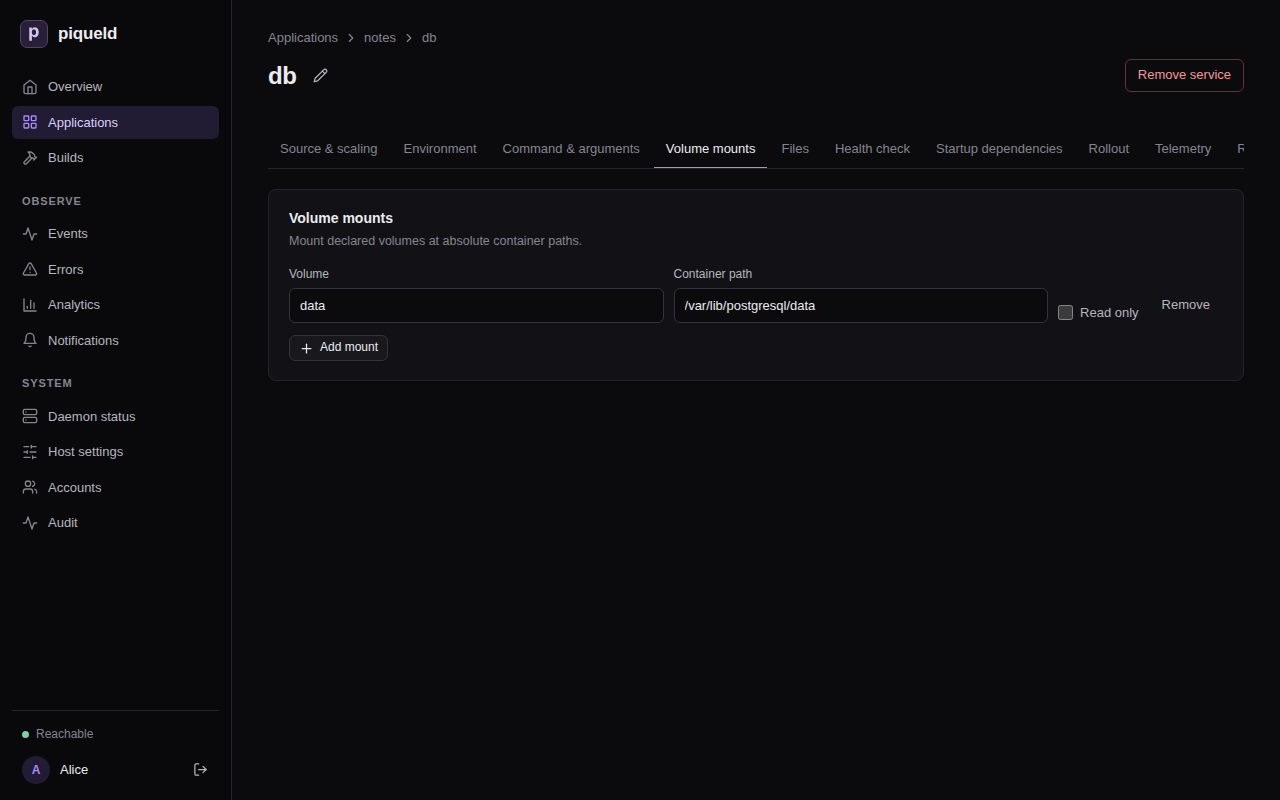
-
Select Deploy to production.
With piquelctl
piquelctl app volume add notes data
piquelctl app service mount set notes db data /var/lib/postgresql/data
piquelctl --timeout 5m app deploy notes
In the manifest
-
Declare the volume, at the end of
notes.toml:[[spec.volumes]] name = "data" -
Mount it in the
dbentry, after its other settings:[spec.services.healthcheck] type = "command" command = ["pg_isready", "-U", "notes"] interval_seconds = 5 start_period_seconds = 30 + +[[spec.services.mounts]] +volume = "data" +target = "/var/lib/postgresql/data" [[spec.services]] name = "web" -
Deploy:
piquelctl --timeout 5m app apply --file notes.toml --deploy
Mount a volume read-only
Several services can mount the same volume. One that only reads it can mount
it read-only, such as a web server that serves the files another service
writes to an uploads volume. In the dashboard, check the mount’s Read
only. With piquelctl, add --read-only to mount set. In the manifest,
add read_only to the mount:
[[spec.services.mounts]]
volume = "uploads"
target = "/usr/share/nginx/html/uploads"
read_only = true
A service that mounts a volume it can write to stops its old container before starting the new one, so that two copies never write the same files. It’s briefly unavailable at each deployment; see rollout order.
What happens to volume data
piqueld keeps the volume data of environments, but not of previews:
- Removing a volume from the manifest keeps its data. Declare a volume of the same name again, and the environment gets its data back.
- Deleting an environment keeps its volumes, with their data, in Docker on the host. A new environment never reuses them, even with the same name: it gets new, empty volumes.
- Deleting an application keeps its environments’ volumes, in the same way, but deletes its previews, with their volumes.
- Deleting a preview deletes its volumes and their data.
So back up a volume before you delete its environment. Its data then stays on
the host until you remove it with Docker: the volume’s name starts with
piqueld- and the environment’s ID, as piquelctl env show prints it.
Back up a volume
piquelctl app exec runs a command in the service’s container and streams its
output, so you can save a backup on your machine. It needs the apps:exec
permission; see running commands.
For a database, use its own dump tool, which makes a consistent copy while it runs:
piquelctl app exec notes db -- pg_dump -U notes notes > notes.sql
To restore it, send the dump to an empty database:
piquelctl app exec notes db -i -- psql -q -X -v ON_ERROR_STOP=1 --single-transaction -U notes -f - notes < notes.sql
ON_ERROR_STOP and --single-transaction make psql stop at the first
error and keep nothing of the dump, instead of restoring part of it. The dump
creates its tables, so restoring it into a database that already has them
fails.
For other files, archive the directory where the volume is mounted, and
extract the archive there to restore it. For a service api that keeps
uploaded files in a volume mounted at /srv/uploads:
piquelctl app exec notes api -- tar -cz -C /srv/uploads . > uploads.tar.gz
piquelctl app exec notes api -i -- tar -xz -C /srv/uploads < uploads.tar.gz
Don’t archive a running database’s files this way: the copy may be inconsistent. To restore, the volume must be mounted writable.
piqueld’s own backup doesn’t include volumes, so back them up separately.
Mount a read-only file
piqueld can mount a configuration file you write, such as nginx’s
/etc/nginx/conf.d/default.conf, into a service:
-
In the dashboard, use the service’s Files tab: select Add file, then enter the Container path and the Content, and select Save changes.
-
With
piquelctl, read the content from a file on your machine:piquelctl app file add notes web /etc/nginx/conf.d/default.conf --from ./default.conf--fromsaves the file’s content in the manifest when you run it. Use--contentto give the text directly. -
In the manifest, add it to the
webentry, after its other settings:[spec.services.healthcheck] type = "http" port = 80 path = "/" + +[[spec.services.files]] +target = "/etc/nginx/conf.d/default.conf" +content = """ +server { + listen 80; + location / { + root /usr/share/nginx/html; + } +} +"""
Deploy to mount it. Only the services that mount a changed file are replaced.
The file is read-only, owned by root, with mode 0444: set another in
Mode, with --mode, or with mode = "0440". piqueld mounts the content exactly as written: it
never replaces ${{ … }} or anything else in it. Each file holds up to
512,000 bytes of text, and an application’s files 2 MiB in total.
An application whose manifest is in a Git repository, as in deploying on push, can also mount files from that repository; see files.
Check that it works
The service’s Files tab lists its files, and piquelctl app file list notes
lists the application’s:
SERVICE  TARGET  MODE  SOURCE
web  /etc/nginx/conf.d/default.conf  0444  inline, 85 bytes
To see them in the container, run a command:
$ piquelctl app exec notes web -- ls -l /etc/nginx/conf.d/default.conf
-r--r--r--    1 root     root            85 Oct 24 11:14 /etc/nginx/conf.d/default.conf
Troubleshooting
- Removing a volume fails with
mount_volume_missing. A service still mounts it. Remove the mount first, withpiquelctl app service mount remove notes db /var/lib/postgresql/data. - The service can’t write to a file. Files are always read-only. An image that rewrites its configuration when it starts needs the file copied somewhere writable first, for example by its command.
- Adding a file fails with
file_target_invalid. Another file, volume or secret of the service already uses that path, or the path is in/run/secretsor/run/piqueld, which piqueld uses. - The service can’t write to its volume. A new volume takes the owner of the directory the image has at the mount’s path, or belongs to root if the image has none. A service that runs as another user can only write to a volume mounted where its image has a directory it owns.
- The database’s data is gone after a new deployment. Check that the volume
is mounted where the image keeps its data, such as
/var/lib/postgresql/datafor PostgreSQL. Data written anywhere else is lost when the container is replaced.