Running jobs before a rollout
A job runs a command to completion during each deployment, before the new version of your services starts. Use it for database migrations, so that the new version only ever runs on a migrated database.
Before you start
- Your application’s image has a command that migrates its database. This
page creates
reader, an application that runs Miniflux, a feed reader whoseminiflux -migratemigrates its PostgreSQL database. - Run the commands on this page on the host, or on any machine where
piquelctlis signed in. - Creating
readerneeds theapps:createpermission, and storing its secretssecrets:writeon it. Editing it needsapps:write, deploying itapps:deploy, and reading a job’s outputlogs:read.
Set it up
-
Save this manifest as
reader.toml:api_version = "piqueld.dev/v1alpha1" kind = "Application" [metadata] name = "reader" [[spec.services]] name = "db" [spec.services.source] type = "image" image = "postgres:17-alpine" [spec.services.environment] POSTGRES_USER = "reader" POSTGRES_DB = "reader" POSTGRES_PASSWORD_FILE = "/run/secrets/db-password" [[spec.services.secrets]] name = "db-password" target = "/run/secrets/db-password" [spec.services.healthcheck] type = "command" command = ["pg_isready", "-U", "reader"] interval_seconds = 5 start_period_seconds = 30 [[spec.services.mounts]] volume = "data" target = "/var/lib/postgresql/data" [[spec.services]] name = "web" depends_on = ["db"] [spec.services.source] type = "image" image = "miniflux/miniflux:2.3.4" [spec.services.environment] DATABASE_URL_FILE = "/run/secrets/database-url" [[spec.services.secrets]] name = "database-url" target = "/run/secrets/database-url" [spec.services.healthcheck] type = "http" port = 8080 path = "/healthcheck" [[spec.volumes]] name = "data"dbruns PostgreSQL, with its data in a volume.webruns Miniflux, which reads the database’s address, password included, from the secretdatabase-url. Both secrets are stored, sincedatabase-urlholds the password ofdb. You can also createreaderin the dashboard or withpiquelctl, as in configuring services. -
Create the application, without deploying it:
piquelctl app apply --file reader.toml -
Store a new password for
db, and the addresswebconnects to with it. On the application’s Secrets tab, save them asdb-passwordanddatabase-url. Withpiquelctl:password=$(openssl rand -hex 32) printf '%s' "$password" | piquelctl app secret reader set db-password --stdin --yes printf 'postgres://reader:%s@db:5432/reader?sslmode=disable' "$password" | piquelctl app secret reader set database-url --stdin --yes -
Add the job,
migrate, which runsminiflux -migrateinweb’s image before the services roll out:-
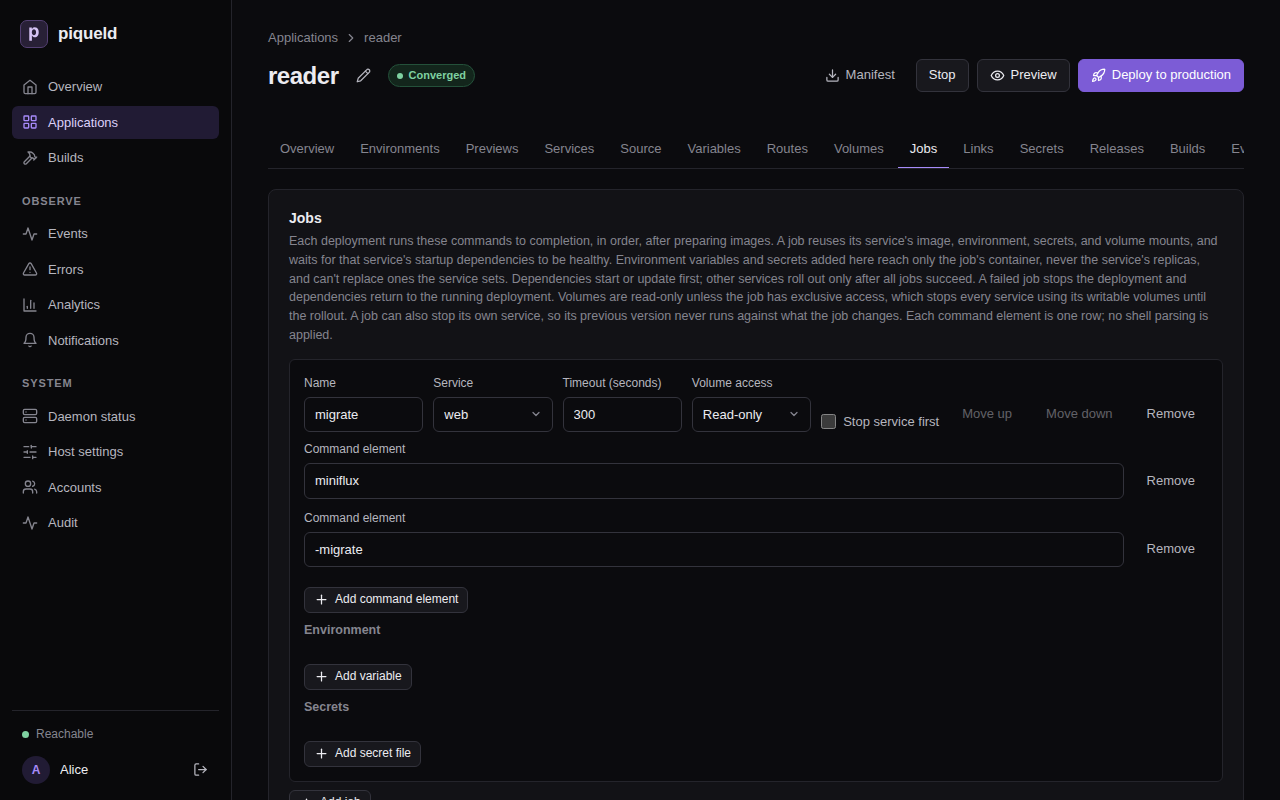
In the dashboard, open the application’s Jobs tab and select Add job. Enter the Name, pick the Service, and enter the command, one Command element per row: Add command element adds a row. Then select Save changes.
-
With
piquelctl, give the job’s name, its service, and its command after--:piquelctl app job set reader migrate web -- miniflux -migrate -
In the manifest, add it at the end of
reader.toml, then save it withpiquelctl app apply --file reader.toml:[[spec.jobs]] name = "migrate" service = "web" command = ["miniflux", "-migrate"] run = "before-rollout"run = "before-rollout"is required: it’s the only choice.
The job runs its service’s image, with its environment variables, secrets, volumes and network: here, it gets
web’s database address. Its command runs without a shell, and replaces the image’s entrypoint, so name the program itself. -
-
Deploy: select Deploy to production, or run
piquelctl --timeout 10m app deploy reader.--timeout 10mwaits longer than the job may run, five minutes by default, and the rollout after it.
Each deployment now runs the job before the rollout:
- It starts or updates the services
webdepends on, heredb, and waits until they’re healthy. - It runs
migrate, and waits until it exits. - Once the job has succeeded, it rolls out the services.
While the job runs, the previous version of web, if there is one, keeps
serving, unless the job stops it first.
The job runs at every deployment, even when nothing changed, so it must succeed
when there’s nothing to do. miniflux -migrate then only checks that the
database is up to date. Restoring an earlier deployment
skips its jobs, so the database stays as the latest migration left it.
piqueld doesn’t undo what a job changes, even when the deployment fails. Once the database holds data, back it up before you deploy a version that migrates it.
Give the job its own variables and secrets
A job can get environment variables and secrets that its service doesn’t, such as a more detailed log for the migration. The job gets them on top of its service’s, and the service’s replicas never get them. An application that reads a separate credential to change its database’s schema, for example, can give it to its migration only.
A job can’t change what its service sets: a variable the service sets, or a path the service mounts something at, fails validation.
-
In the dashboard, the job’s Environment and Secrets sections list them: select Add variable or Add secret file.
-
With
piquelctl, add--env KEY=VALUEand--secret NAME=TARGETtojob set, once for each:piquelctl --timeout 10m app job set reader migrate web --env LOG_LEVEL=debug --deploy -- miniflux -migrateThey replace the job’s own variables and secrets. Without them,
job setkeeps the job’s, and--clear-envand--clear-secretsremove them. -
In the manifest, add them after the job’s other settings.
[[spec.jobs.secrets]]mounts a secret in the job alone, as[[spec.services.secrets]]does in a service:[[spec.jobs]] name = "migrate" service = "web" command = ["miniflux", "-migrate"] run = "before-rollout" + +[spec.jobs.environment] +LOG_LEVEL = "debug"
Set a timeout
A job that runs longer than its timeout is stopped, and the deployment fails. The timeout is 300 seconds by default, and at most 86,400 (a day).
-
In the dashboard, it’s the job’s Timeout (seconds).
-
With
piquelctl, add--timeout-secondstojob set, which also takes the job’s service and command:piquelctl --timeout 15m app job set reader migrate web --timeout-seconds 600 --deploy -- miniflux -migratepiquelctl --timeout 15mwaits longer than the job may run. -
In the manifest, it’s
timeout_seconds:[[spec.jobs]] name = "migrate" service = "web" command = ["miniflux", "-migrate"] run = "before-rollout" +timeout_seconds = 600
Run several jobs
Jobs run one after the other, in their order, and the services roll out once
every job has succeeded. To change the order, move a job to another position.
With a second job, such as a seed job that reader doesn’t have, run seed
first: select Move up next to it on the Jobs tab, or run:
piquelctl --timeout 10m app job move reader seed 1 --deploy
In the manifest, jobs run in the order the manifest lists them.
Jobs and volumes
While a job runs, the previous version of its service keeps running and writing its volumes. So by default, the job mounts its service’s volumes read-only.
A migration that has to write a volume needs exclusive access, such as for a
service app that keeps an SQLite database in a volume. In the dashboard,
pick Exclusive under the job’s Volume access. With piquelctl, add
--volume-access exclusive to job set. In the manifest:
[[spec.jobs]]
name = "migrate"
service = "app"
command = ["app", "migrate"]
run = "before-rollout"
volume_access = "exclusive"
Then, before the job runs, piqueld stops every service that mounts one of its
service’s writable volumes. They start again with the rollout. Those services
are unavailable meanwhile, and piquelctl app plan --file <manifest> warns
about it with job_stops_services, naming the services that stop. reader
doesn’t need it: its web mounts no volume.
If the job, or a later one, fails, the services it stopped start again with their previous version, on the data the job changed.
Stop the service while the job runs
A migration that drops or renames something the previous version still uses would break that version while the job runs. To avoid it, stop the job’s own service first:
-
In the dashboard, check Stop service first on the job, on the Jobs tab, and select Save changes.
-
With
piquelctl, add--stop-service ontojob set:piquelctl --timeout 10m app job set reader migrate web --stop-service on --deploy -- miniflux -migrate--stop-service offturns it off again. Without either,job setkeeps the job’s setting. -
In the manifest, set
stop_service:[[spec.jobs]] name = "migrate" service = "web" command = ["miniflux", "-migrate"] run = "before-rollout" +stop_service = true
Once the job’s startup dependencies are ready, piqueld stops the service, here
web, and starts the job once its containers have exited. The service starts
again with the rollout, or with its previous version if a job fails. It is
unavailable meanwhile, and piquelctl app plan warns about it with
job_stops_services. To avoid that outage, split the change into migrations
that both versions can run beside.
If a job fails
A job fails when it exits with a code other than 0, or runs past its timeout.
The deployment then stops before the rollout. The environment’s
Deployments tab says why, and so does piquelctl:
Error: operation ended in state failed

Context:
...
Code: job_failed
Message: job migrate exited with status 1; rollout stopped
...
The services keep running their previous version, and the environment shows as degraded until a deployment succeeds. The services the job depended on return to their previous version too, unless this was the first deployment. Anything the job changed, such as the database, stays changed.
piqueld doesn’t run a failed job again on its own. Read its output, fix the cause, and deploy again.
Check that it works
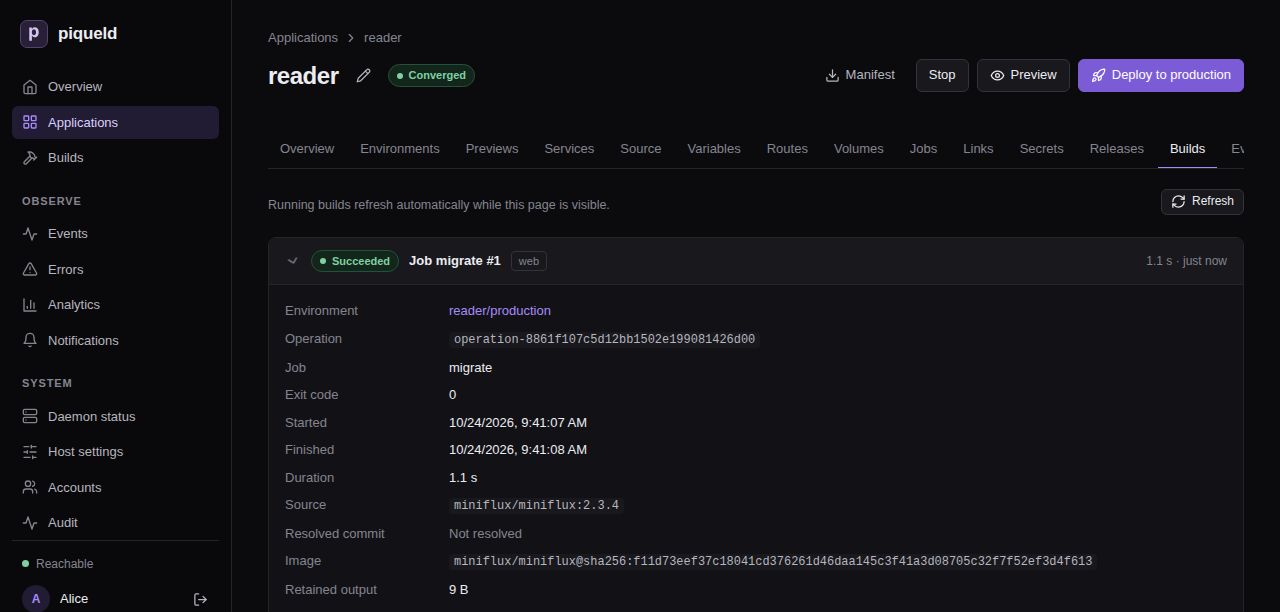
Each run of a job, with its output, is kept in the application’s build history. In the dashboard, open the application’s Builds tab, and select a run to see its output.
piquelctl builds list lists the latest runs and builds, newest first:
$ piquelctl builds list
1  env-01a16da791427563adb574452b389f93  job migrate (web)  Succeeded  1792841094238
The first column is the run’s ID. Read its output:
$ piquelctl builds logs 1
level=INFO msg="Running database migrations" current_version=0 latest_version=135
Troubleshooting
- The deployment fails with
job_failed. Read the job’s output on the Builds tab, or withpiquelctl builds logs. Its last line says how the container ended, such aspiqueld: task: non-zero exit (1). - The deployment fails with
job_timeout. The job ran longer than itstimeout_seconds. Raise it, or find out what the job waits for. - Validation fails with
job_setting_conflict. The job sets a variable, or mounts a secret at a path, that its service already uses. Rename one of them. - Validation fails with
job_dependency_order_invalid. A job’s service depends, directly or through others, on a service whose job comes after it. Move that job before it. - Validation fails with
job_volume_access_invalid. An exclusive job’s service mounts no writable volume, or one of the job’s startup dependencies mounts the same volume. - The job can’t reach a service. On the first deployment, only the job’s
startup dependencies run when it starts. Add the services it needs to its
service’s
depends_on. - The job behaves differently from its service. The job’s command replaces
the image’s entrypoint, so a setup script the entrypoint runs, such as one
reading
_FILEvariables, doesn’t run for the job. - The job can’t reach another application. A job can’t use a link on the deployment that adds it. Deploy the import first.
Manifest settings lists every job setting, and the manifest reference describes how jobs run.