Receiving webhooks
This page lets GitHub tell piqueld about each push, so that applications that
deploy on push with
sync = { mode = "webhook" } deploy it right away. GitHub needs a public
address to send these reports to, but piqueld’s API and dashboard stay off the
internet. So piqueld receives them on a webhook hostname: a public hostname on
which it accepts GitHub’s push webhooks, and nothing else.
Before you start
- The gateway serves public routes, on ports 80 and 443 or through a Cloudflare Tunnel; see Serving an application over HTTPS. Or you run your own reverse proxy.
- A hostname for webhooks alone, such as
hooks.example.com. Applications can’t route it or any name below it, so don’t pick your website’s domain: withhooks.example.com,example.comand its other subdomains stay available. - An application whose manifest lives in a GitHub repository; see repository-backed manifests.
- Run
piquelctlon the host, or on any machine where it is signed in. - Generating the webhook secret needs the
apps:writepermission on the application, and turning on deploying on pushapps:deploytoo. The dashboard hides or disables the controls you can’t use.
Set it up
-
Set the hostname in your configuration:
services.piqueld.settings.ingress = {
  enabled = true;
  webhook_hostname = "hooks.example.com";
};
Or, in
config.toml:[ingress] enabled = true webhook_hostname = "hooks.example.com" -
Rebuild the system, or restart the daemon. piqueld reads the setting only when it starts.
-
Create the hostname’s DNS records, as for a public route: an A record to your server, or a proxied CNAME record to your tunnel. If piqueld manages your DNS records, it creates them.
The gateway gets the hostname’s certificate like a public route’s. Through a tunnel, Cloudflare serves its HTTPS.
-
Make the application deploy on push with the webhook:
-
In the dashboard, open the application’s Source tab, set Deploy on push to Webhook: when GitHub reports a push, then select Save changes.
-
With
piquelctl, useapp repository sync:piquelctl app repository sync notes webhook -
In the manifest you apply with
piquelctl app apply, setsyncin[spec.manifest]. piqueld ignores it in the file it fetches from the repository.[spec.manifest] sync = { mode = "webhook" }
-
-
Opt the
productionenvironment in. Pushes deploy only the environments that opt in, andproductiondoesn’t by default:-
In the dashboard, open the environment’s Overview. In its Source card, select Deploy on push. Its Deploy on push label then says
following. -
With
piquelctl, useenv sync:piquelctl env sync notes production on -
In the manifest, set
syncin the environment’s declaration:[spec.environments.production] sync = true
An environment that was never deployed starts following pushes from its first deployment. Until then, the label says
waiting for a deployment. -
-
Generate the application’s webhook secret. Each application has its own payload URL, ending with its ID, and its own secret.
In the dashboard, the Source tab now has a GitHub webhook card. Select Generate secret: the card shows the new secret below the payload URL.
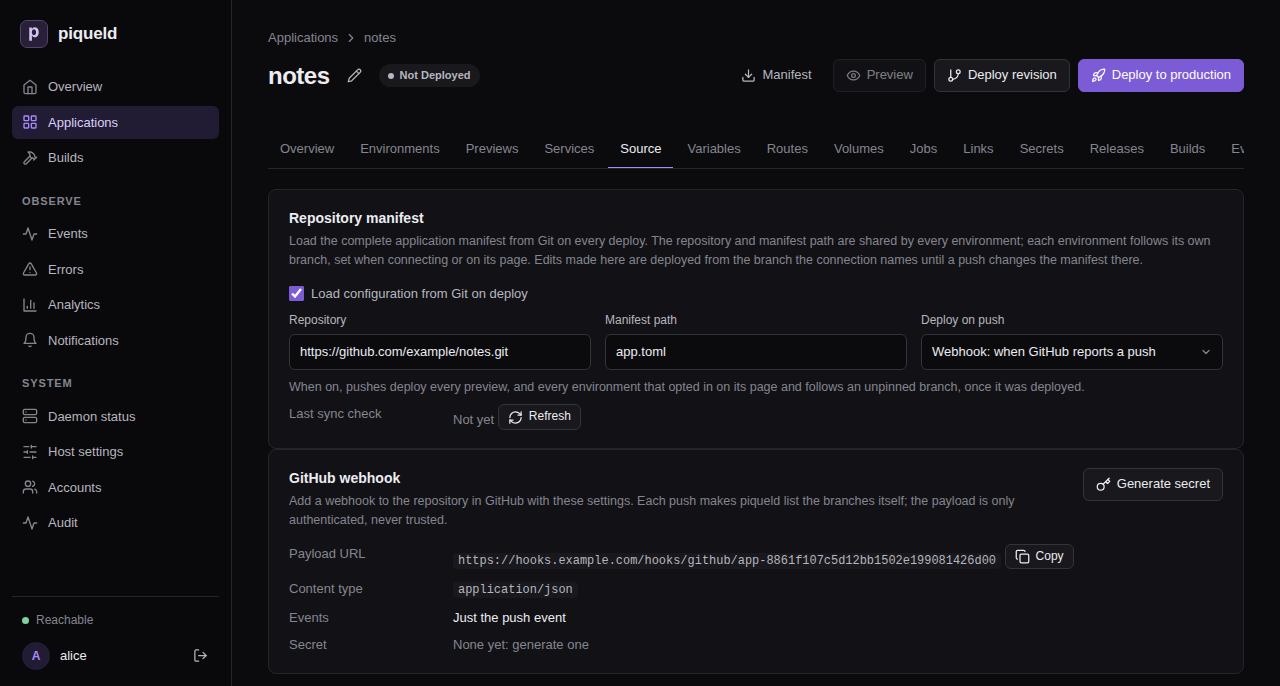
With
piquelctl, after you confirm, the command prints the payload URL and the new secret:$ piquelctl app repository webhook rotate notes Payload URL: https://hooks.example.com/hooks/github/app-01a16b4ba32d7170a360c97d0a2cd503 Secret: <64 hexadecimal characters> Configure this secret in GitHub now; piqueld never shows it again. -
In GitHub, add a webhook to the application’s repository, as GitHub’s Creating webhooks describes, with:
- the payload URL from step 6;
- the content type
application/json; - the secret from step 6;
- only the
pushevent.
The deploying on push reference describes the application’s side.
Check that it works
In GitHub, the webhook’s
recent deliveries
list its first one, a ping, answered with 204. Each push then adds a
push delivery, also answered with 204.
The GitHub webhook card shows the webhook’s settings again, without the
secret, and so does piquelctl:
$ piquelctl app repository webhook show notes
Payload URL: https://hooks.example.com/hooks/github/app-01a16b4ba32d7170a360c97d0a2cd503
Content type: application/json
Events: push
Secret: generated; rotate it to see a new one
From any machine, a request for anything else on the hostname gets a 404:
$ curl -s -o /dev/null -w '%{http_code}\n' https://hooks.example.com/
404
What piqueld accepts
piqueld only accepts POST requests to
https://hooks.example.com/hooks/github/<application-id>, signed with that
application’s secret, the way GitHub signs them in its
X-Hub-Signature-256 header:
| Response | When |
|---|---|
| 204 | The delivery is signed with the application’s secret. |
| 401 | It isn’t signed, or the signature is wrong, or the application doesn’t exist or has no secret yet. |
| 404 | Any other path. |
| 405 | Another method than POST, on a webhook path. |
| 408 | The request took more than 10 seconds. |
| 413 | Its body is over 1 MiB. |
| 503 | piqueld can’t read the application’s secret, or 16 deliveries are already being handled. |
Plain HTTP requests are redirected to HTTPS. Through a tunnel, Cloudflare redirects them once Always Use HTTPS is on.
A signed push makes piqueld check the repository’s branches soon, at most
once every 30 seconds for each repository. Other events, such as GitHub’s
ping, change nothing. piqueld never reads what a delivery says: it lists the
branches itself, so a delivery can’t choose what gets deployed.
piqueld shows each secret only once. A new one, from Rotate secret in the
dashboard or webhook rotate, replaces the old one at once, so give it
to GitHub straight away. Like other secrets, it is encrypted with the
secret master key, and lost-key
recovery deletes it.
Refused deliveries aren’t recorded in the audit trail. A wrong signature is
logged as webhook delivery refused: its signature does not verify.
Behind your own reverse proxy
piqueld serves webhooks whenever webhook_hostname is set, even with
ingress.enabled = false. It listens on a Unix socket in its data directory,
/var/lib/piqueld/ingress/control/webhooks.sock by default. Without the
gateway, another reverse proxy can forward to it:
- It serves HTTPS for the webhook hostname.
- It forwards only paths starting with
/hooks/github/to the socket. - It runs as the daemon’s user,
piqueld, the only one that can open the socket. - It refuses request bodies over 1 MiB, like the gateway.
webhook show prints the same address. Without the gateway, piqueld doesn’t
manage the hostname’s DNS records or certificate: you create the records, and
your proxy gets the certificate.
Troubleshooting
- The GitHub webhook card says
This daemon does not receive webhooks, orwebhook showprintsnot served; set ingress.webhook_hostname on the daemon. Set it, as in Set it up, and restart. - GitHub reports
401. The secret in GitHub isn’t the application’s current one, or the address ends with the application’s name instead of its ID. Copy the address from the GitHub webhook card orwebhook show, and generate a new secret if you no longer have it. - GitHub reports
503. Check the daemon logs: piqueld can’t decrypt the secret, for example after its secret key changed. - A route for the webhook hostname, or a name below it, is refused with
hostname_conflict. piqueld keeps it for webhooks. - The daemon doesn’t start, with
ingress.private.dashboard_hostname must differ from ingress.webhook_hostname. Use two different hostnames.