Changing the documentation
The documentation is an mdBook book
built from the Markdown files under docs/. book.toml, at the repository
root, configures it.
Where pages go
docs/user/is the user guide, for people who run piqueld and deploy applications to it. Its pages say what piqueld does and how to use it, not how it is implemented.docs/dev/is the developer guide, for people who change piqueld: development setup, testing, architecture, and how to extend it.docs/SUMMARY.mdis the table of contents. A page it doesn’t list is not published, and a page it lists that doesn’t exist fails the build.docs/openapi-v1.json,docs/application-manifest.schema.jsonanddocs/piqueld-config.schema.jsonare generated byjust generate; never edit them by hand. The book publishes them alongside its pages.docs/user/reference/cli-commands.md,docs/user/reference/manifest-settings.mdanddocs/user/reference/configuration-settings.mdare generated byjust generatetoo. The first comes from piquelctl’s clap definitions, the others from the manifest types incrates/piqueld-core/src/manifestand the daemon’s configuration types inapps/piqueld/src/config, through their JSON Schemas. To change them, change the///doc comments, which are alsopiquelctl --helpand the schemas’ descriptions that editors show, keeping them about what the reader can see and do, then runjust generate. Notes for developers go in//comments, which stay out of the schemas. The command reference’s layout and introduction are inapps/piquelctl/examples/cli_reference.rs, the settings references’ inapps/piqueld/examples/generate_openapi.just openapi-check, which CI runs, fails when a generated file is stale..gitattributesmarks every generated file so GitHub collapses it in pull request diffs; list a new one there too.
Images go in docs/images/; see screenshots.
Writing
- Update the documentation in the same pull request as the change it describes.
- Describe a feature through each of its surfaces: the dashboard,
piquelctl, and the manifest. When a task can be done on more than one, show each way, in that order, and never present one as the only way. Keep each short: a subsection, or a sentence for a small change. If a surface can’t do it, say so. - Keep a page to one task or topic, and link to the reference rather than repeating it.
- Describe how piqueld works now, not how it changed. Database migrations explain themselves in their SQL comments, and commit history records the rest.
- Write placeholders in prose as
`<name>`or\<name>. A bare<name>is an HTML tag: it hides the text, andjust docsfails.
Style
Write so that someone new to piqueld can follow the page from top to bottom.
- Start with the reader’s goal. Open each page with one or two sentences saying what it helps them do.
- Keep sentences short, one idea per paragraph. A sentence that needs a parenthesis and a semicolon is two sentences.
- Show, then explain. Put the command or manifest first, then say what it does and what the reader should see.
- Number the steps of a procedure. Give each step one action.
- Say where each command runs, on the host or on the reader’s machine, and keep the connection the same across a page’s examples.
- Warn before a command that deletes data or can’t be undone, not after it.
- Cover the main path first. Limits, edge cases and failure modes go at the end of the page, under Troubleshooting, or in the reference.
- Leave internals out of the user guide. Explain what the reader can see and do; how the daemon does it belongs in the developer guide.
- Address the reader as “you”, use the present tense, and write the labels of dashboard buttons and fields in bold, exactly as they appear.
- Link a concept where it is first mentioned instead of explaining it again.
For example, rather than:
app applysaves configuration;app apply --deployalso creates a deployment and waits for its operation. Add--no-waitto return after acceptance.
write:
Save the manifest and deploy it:
piquelctl app apply --file notes.toml --deployThe command waits until the deployment finishes. Without
--deploy, it only saves the manifest.
The user guide’s feature guides share one outline:
# <Feature>

What it does and when to use it, in a sentence or two.

## Before you start

What the reader needs first: permissions, other features, external accounts.

## <Task>

Numbered steps, through the dashboard, `piquelctl`, and the manifest. Give
each task its own section, named after what the reader does, such as
"Deploy every push".

## Check that it works

## Troubleshooting
Reference pages list every setting instead, each with what it does and its
default. The generated ones leave examples to the guides and the pages they
link to, such as examples/piqueld.toml.
Screenshots
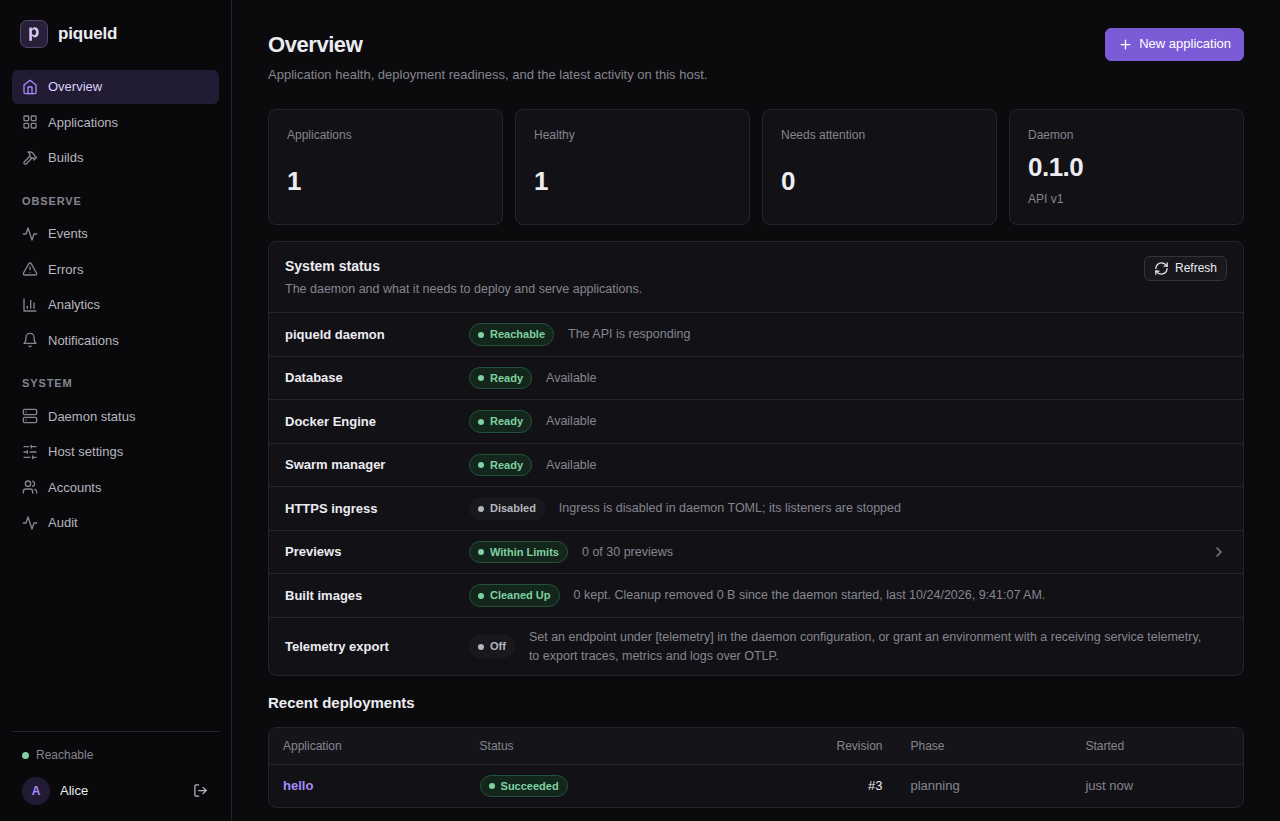
Show the dashboard where it helps the reader find their way, such as the first time a guide uses a page, and each meaningful step of a procedure done in the dashboard.
Screenshots are generated, never taken by hand, so they always match the dashboard. Regenerate them all after changing a page they show:
just setup-playwright   # once
just docs-screenshots
The recipe runs the specs in tests/playwright/screenshots/ with the daemon
of the browser tests,
in a mode where it deploys to an in-memory Docker engine: deployments succeed,
services report healthy, and commands run in them exit with 0. Each spec
seeds example data the way its guide does, then saves each page into
docs/images/<section>/. The daemon runs no ingress gateway, so screenshots
show HTTPS ingress as disabled, as on a daemon with the default
configuration. It shows webhook URLs on hooks.example.com, as the guides
configure it, but nothing listens there.
Each image records a fingerprint of the page it shows: its content and
styles, not its pixels, which vary slightly from run to run. The recipe shoots
a page again only when its fingerprint changed, so a run that changes nothing
leaves the images untouched. CI runs it with --update-snapshots=none, and
fails when an image shows an older version of its page:
just docs-screenshots --update-snapshots=none
To add a screenshot, extend the spec of its guide, or add a spec for a new
guide. screenshots/docs.ts holds the helpers:
- one helper per page or state, such as
overview, which waits for its data to settle. Add one for each new page you show. - helpers for the dashboard steps the guides take, such as
createApplication, so a spec seeds its data in the dashboard where the guide shows it. manifest, which reads a TOML block of a guide, andPiquelctl, which applies it and runs the guide’s other commands.GitHost, whose repositories the daemon reads at the URLs the guides use, such ashttps://github.com/example/blog.git. Its commits get the same IDs on every run.shoot(page, '<section>/<name>', through, from), which saves the page, 1280 pixels wide and cut just below the elementthrough, asdocs/images/<section>/<name>.png. Withfrom, the image starts just above that element instead of at the top of the page. It first replaces IDs and digests with fixed ones, and moves every date by the same amount, the earliest to a fixed one, so the images don’t change from run to run.
await newApplication(page, 'hello');
await shoot(page, 'getting-started/new-application');
await createApplication(page, 'hello');
// …
await overview(page);
await shoot(page, 'getting-started/overview', page.getByRole('region', { name: 'Recent deployments' }));
Link each image with a relative path, and give it alt text that says what it shows, for readers who can’t see it:
Links
- Link to another page with its path relative to the current page. From a
page in
docs/user/operations/, for example, the manifest’s routes are[routes](../reference/manifest.md#routes). These links work both on GitHub and in the book. - Link to a repository file outside
docs/with its GitHub URL onmain, such ashttps://github.com/sourceorigin-dev/piqueld/blob/main/examples/piqueld.toml(treeinstead ofblobfor a directory). A relative path would break in the book. The link check resolves these URLs against your checkout, so the file must exist on your branch, and fails links to any other branch or commit. - A heading’s anchor is its text in lower case, with spaces replaced by hyphens and punctuation removed. Renaming a heading breaks the links to it; the link check finds them.
Building and checking
nix develop provides mdBook and lychee at the versions flake.lock pins.
Without Nix, install them with cargo install --locked mdbook lychee.
just docs-serve   # serves the book on localhost:3000, rebuilding on every change
just docs         # builds the book into target/book and checks it
just docs fails on any mdBook warning, then checks with
lychee every link and heading anchor in the built
book and in the repository’s other Markdown files, such as README.md. It
works offline, so it doesn’t check links to other websites; CI would otherwise
fail whenever one of them is down.
The docs CI job runs just docs on every pull request, drafts included,
because a change anywhere in the repository can break a link to it. It uses
nix develop .#docs, so CI and your shell run the same versions.
Every push to main publishes the book at https://docs.piqueld.dev; see
publishing piqueld.dev. To read a branch’s book as it would
be published, deploy it to a preview.